
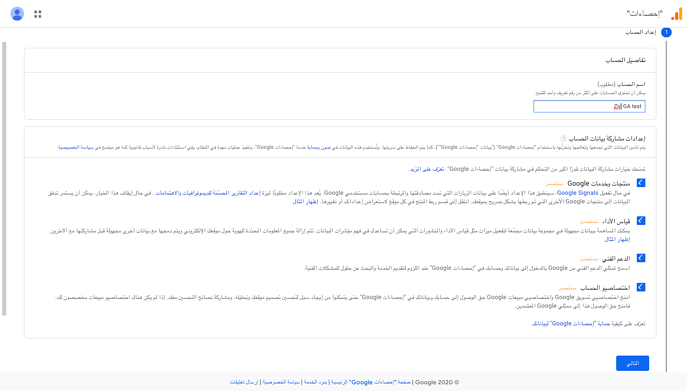
Establishment and linkage of the Google Analtex account Google Analytics created and linked the Analtex Google What's Google Analtex? The Google statistical tool is a free tool from Google that helps you find out...
Construction and linking of Google Analtex account
Google Analytics created and linked the Analtex Google
What's Google Analtex?
8.8%d% 8% 8% 88%d% 88%d% 8% 8%d% 8% 8%d% 8% 8% 8%d%%% 8%d%%8%d%8%d%8%8%d%8%d%8%8%d%8%d%8%d%8%d%8%d%8%8%d%8%d%8%d%d%8%d%d%d%8%8%d%d%d%8%8%8%d%d%d%8%8%d%8%8%d%d%8%d%8%8%d%d%d%d%d%d%d%d%d%8%8%8%8%8%8%d%d%d%8%d%d%d%8%d%8%8%8%d%8%8%8%d%d%d%d%8%d%8%8%d%d%d%8%d%d%d%d%d%d%8%8%8%
Entry on the following link to the establishment of an account on Google Antalx.
Location:
The website (the store) and [the time zone] (https://ar.wikipedia.org/wiki/%D9%85%D9%86%D8%B7%D9%82%D8%A9%D8%A9%D8%D8%B2%D9%85%D9%86%D9%8A%8A%D8%A9), country and currency.
After the addition of the name, the determination of the time zone and the currency, it is very important to press on the show of advanced options step three. - You'll have the option of establishing the Universal Analytics site. It's very important to put pressure on certainty and activate the option. - After the activation, the address of URL will appear to you on the website, the link of the store will be added in step 1 and it is very important to ensure that the two options in step 2 are identified. - Thereafter, a glimpse of your business activity will be presented: through which you can determine the category and size of the activity and the manner in which you use weighted statistics for your business activity and then press the icon of creation.
For example:
- The next page on the terms and conditions of Google will show you the country and then press the icon.
- You'll be transferred to your account and you'll show you the next page, pick out the e-mails you want to get from Google and press on a preservation icon.
- It'll show you the next page.
- Add the link to the store and the name of the data source (the name of the store) and then activate the measurement of the improver and pressure on the establishment of the data source.
- She'll show you the next page.
- Suppose after this step, your account shows up like this, the pressure on number one, number two, then number three, and press the profile. When you get into the account, you move on to the officer's page, then pick up the tracking information, then select the tracking code, copy the tracking code and start it up.
Steps to add Google Anlatex to Trinavo 1 of the store's control board.
Then select the software additives. 2. There are many options in the software additives from which Google Anlatex was chosen and pressured on the icon of the pen that is visible next to it. You write the name of the option and prefer to write your business name. 4. Then click on the marked pencil icon on the front page. 5. Copy the Facebook code. 6. Then you can post the code in the visible box below your choice name. 7. Make sure the option is activated by clicking on an apparent Yes button next to Google Analtx. Keep and close. He then approved the option of updating the system from the control board