
Built for the Food Service Industry
Running a restaurant in today's digital world means meeting customers where they are—online. Whether you operate a single pizzeria, a chain of cafés, or a cloud kitchen, Trinavo provides the specialized tools you need to manage your menu, accept orders, and deliver exceptional customer experiences.
Unlike generic e-commerce platforms that treat food like any other product, Trinavo understands the unique requirements of food service. Our platform includes purpose-built features for menu customization, add-ons, and modifiers that let your customers order exactly what they want.
Product Add-ons: The Restaurant Game-Changer
The real power of Trinavo for restaurants lies in our Product Add-ons system. This feature was designed specifically for food service businesses that need customers to customize their orders with toppings, sides, sauces, and other modifications.
How Add-ons Work
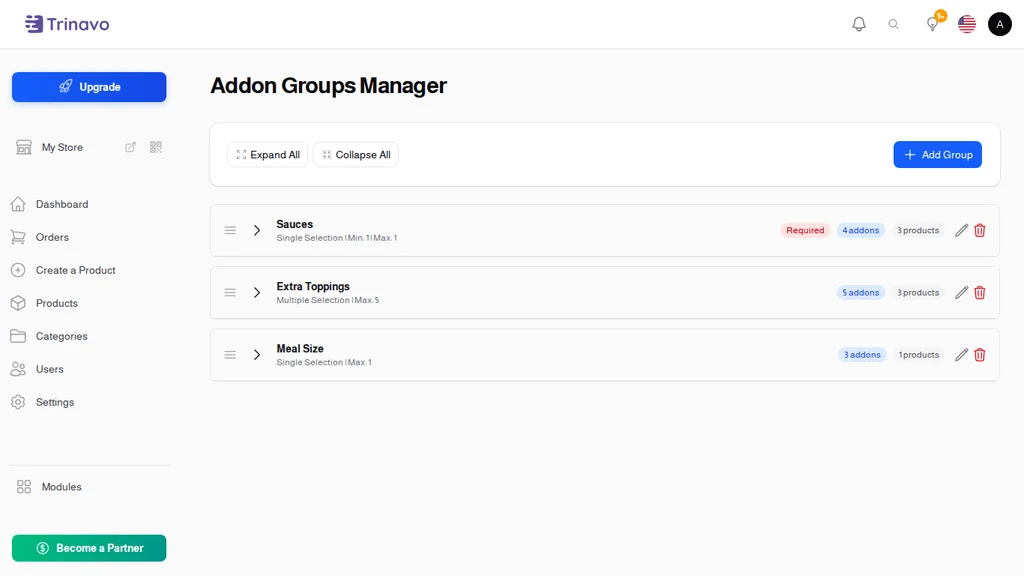
Add-ons are organized into Addon Groups, which you can reuse across multiple menu items. For example:
- Sauce Selection: Ketchup, Mayo, BBQ Sauce, Mustard
- Extra Toppings: Extra Cheese, Pepperoni, Mushrooms, Olives
- Side Orders: Fries, Coleslaw, Onion Rings
- Drink Options: Cola, Sprite, Water, Fresh Juice
Once you create an addon group, you can attach it to any menu item that needs those options. A pizza might use your "Extra Toppings" and "Sauce Selection" groups, while a burger uses "Sauce Selection" and "Side Orders."
Flexible Selection Types
Different menu customizations require different selection behaviors. Trinavo supports:
Single Selection: Customer must choose exactly one option. Perfect for:
- Crust type (Thin, Regular, Thick)
- Cooking preference (Rare, Medium, Well-done)
- Size selection (Small, Medium, Large)
Multiple Selection: Customers can choose several options. Ideal for:
- Pizza toppings (select any combination)
- Salad additions (pick multiple ingredients)
- Sides (choose up to 3 sides)
You can set a maximum number of selections for multiple-choice groups, so customers know they can "choose up to 3 toppings" with their meal.
Required vs Optional Add-ons
Some menu choices are mandatory—a customer ordering a burger needs to specify how they want it cooked. Other choices are optional upgrades. Trinavo lets you mark addon groups as required, ensuring customers complete all necessary selections before checkout.
When a required addon group isn't completed, the customer sees a clear message prompting them to make a selection. This prevents incomplete orders and reduces kitchen confusion.
Pricing Made Simple
Each addon can have its own price—or be free:
- Free Add-ons: Standard sauces, regular toppings included in base price
- Premium Add-ons: Extra cheese (+$1.50), Premium toppings (+$2.00)
Prices automatically calculate as customers make selections. They see a real-time total that includes all their customizations, so there are no surprises at checkout.
Quantity-Based Add-ons
Sometimes customers want more than one of an addon. "Double extra cheese" or "3 portions of garlic sauce" become easy with quantity controls on individual addons.
Set minimum and maximum quantities per addon:
- Minimum 1, Maximum 5 for extra toppings
- Minimum 1, Maximum 3 for sauce portions
Customers use simple +/- buttons to adjust quantities, and pricing updates accordingly.
Setting Up Your Restaurant Menu
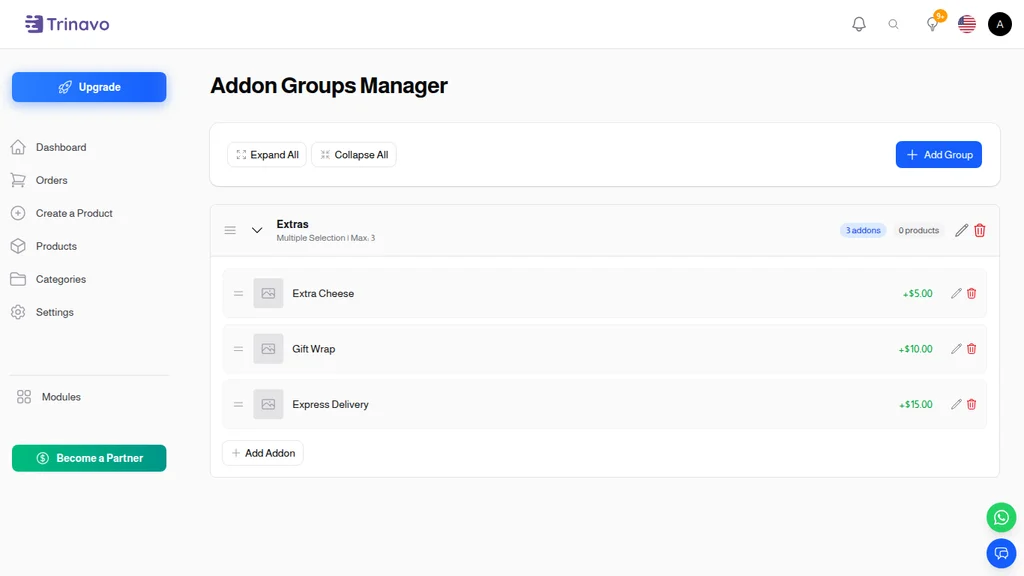
Step 1: Create Your Addon Groups
Navigate to the Addon Groups Manager in your admin panel. Here you'll create all the customization options your menu needs.
Start with your most commonly used groups:
- Click "Add Group" to create a new addon group
- Enter a name (e.g., "Pizza Toppings")
- Choose the selection type (single or multiple)
- Set if it's required or optional
- Define maximum selections if using multiple selection
Step 2: Add Individual Addons
With your group created, expand it to add individual options:
- Click "Add Addon" within the group
- Enter the addon name (e.g., "Extra Mozzarella")
- Set the price (0 for free items)
- Optionally upload an image
- Configure quantity settings if needed
- Mark as default if it should be pre-selected
Step 3: Attach Groups to Menu Items
When creating or editing a menu item (product), navigate to the Addons tab:
- Select which addon groups apply to this item
- Arrange the order groups appear to customers
- Save the product
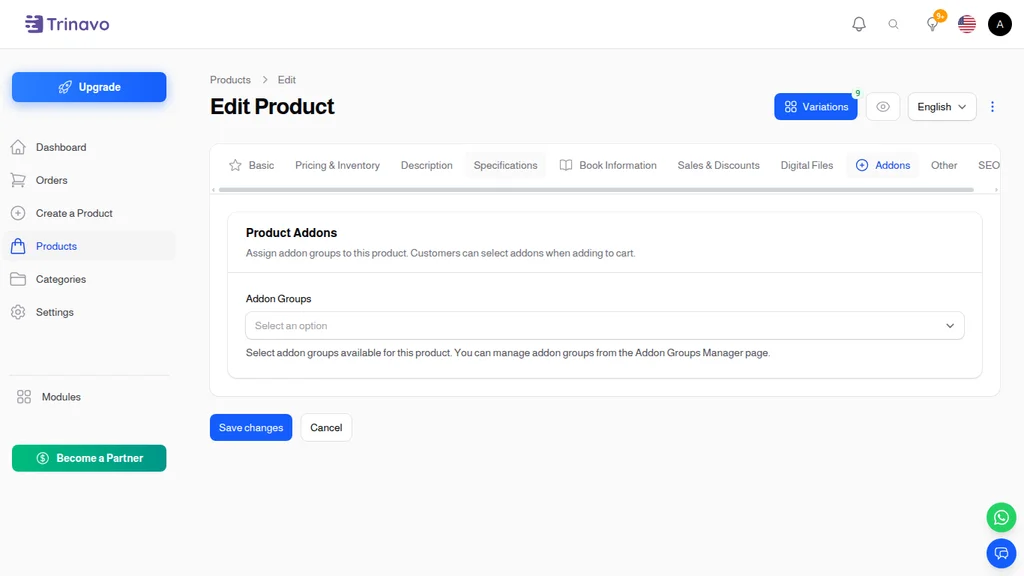
A single pizza product can now offer dozens of customization combinations—different crusts, multiple toppings, various sauces—all from one product listing.
The Customer Experience
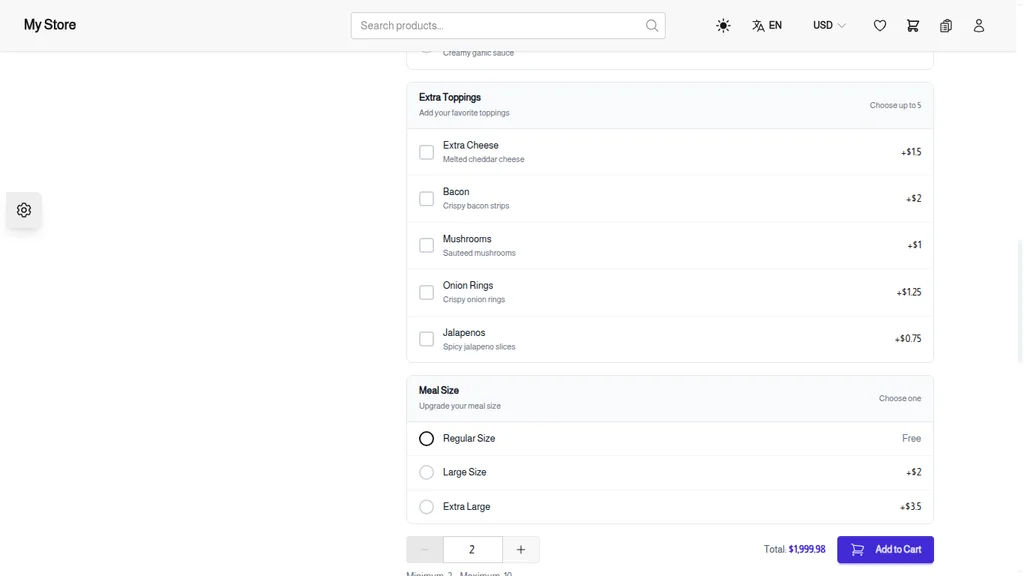
When customers browse your online menu, they see a clean interface that guides them through their order customization.
Selecting Add-ons
On the product page, addon groups appear in order below the main product information. Each group clearly shows:
- Group name and selection instructions ("Choose one" or "Choose up to 3")
- Available options with prices
- Visual indicators for selections made
Customers simply tap or click to select options. For single-selection groups, choosing a new option automatically replaces the previous selection. For multiple-selection groups, customers can select and deselect freely until reaching the maximum allowed.
Real-Time Price Updates
As customers make selections, the total price updates instantly. They see:
- Base product price
- Individual addon prices
- Running total including all customizations
This transparency builds trust and helps customers stay within their budget while building their perfect meal.
Quantity Adjustments
For quantity-enabled addons, +/- buttons appear next to selected items. Want triple extra cheese? Just tap the + button. The quantity and total price update immediately.
Managing Orders with Add-ons
When orders come in, addon selections are clearly attached to each item. Your kitchen staff sees exactly what was ordered:
1x Margherita Pizza (Large)
   - Crust: Thick
   - Extra Toppings: Extra Mozzarella (×2), Pepperoni, Mushrooms
   - Sauce: Garlic Butter

   Item Total: $24.50
Every addon is recorded with:
- Addon name and group
- Quantity ordered
- Price at time of order
- Total for that addon
This snapshot approach means menu changes don't affect past orders. If you raise the price of extra cheese tomorrow, yesterday's orders still show the price customers actually paid.
Perfect For Every Food Business
Pizzerias
Build-your-own pizza options with crust types, sauces, and unlimited topping combinations. Set a maximum number of included toppings with charges for extras.
Burger Joints
Patty cooking preferences, cheese selections, sauce options, and side upgrades. Required groups ensure every order specifies essential choices.
Coffee Shops
Milk alternatives, syrup flavors, size options, and add-on shots. Free add-ons for standard milk with charges for premium alternatives.
Asian Restaurants
Spice levels, protein choices, noodle types, and side selections. Quantity controls for extra protein portions.
Bakeries & Dessert Shops
Frosting flavors, topping combinations, decoration options, and size selections.
Catering Services
Per-person meal customizations, dietary requirement options, and bulk addon pricing.
Beyond Add-ons: Complete Restaurant Features
While add-ons are the standout feature for restaurants, Trinavo provides a complete platform:
Menu Management
- Create categories (Appetizers, Mains, Desserts, Drinks)
- Feature daily specials
- Schedule menu availability
- Support multiple languages for diverse customers
Order Processing
- Real-time order notifications
- Kitchen display integration options
- Order status updates customers can track
- Print tickets directly from orders
Delivery Options
- Multiple delivery methods (pickup, delivery, dine-in)
- Delivery zone configuration
- Delivery time estimates
- Driver assignment tracking
Payment Flexibility
- Multiple payment gateways
- Cash on delivery
- Online payment options
- Split payment support
Customer Relationships
- Customer accounts with order history
- Loyalty points for repeat orders
- Automated marketing emails
- Review and rating system
Start Accepting Orders Today
Your restaurant deserves an ordering system built for food service. Trinavo's addon system lets you offer the same customization customers expect when ordering in person—but with the convenience of online ordering.
From a single-location restaurant to a growing chain, Trinavo scales with your business. Every menu item can be customized. Every order is clearly documented. Every customer gets exactly what they want.
Set up your restaurant menu today and give your customers the ordering experience they deserve.