
The AI Advantage for Your Store
Running an online store is a content marathon. Every product needs a compelling description. Every category needs a clear name and logical placement. Every page needs SEO metadata that search engines actually reward. Doing this well for a dozen products is manageable. Doing it for hundreds — or thousands — is where most store owners burn out.
Trinavo's AI Suite is built to take that weight off your shoulders. It's a collection of AI-powered tools baked directly into your admin panel that write, enrich, organize, and optimize your catalog for you. No external subscriptions to juggle, no copy-pasting between tools, no prompt engineering degree required. You click a button, the AI does the work, and you review the result before it goes live.
The AI Suite includes four main capabilities that work together:
- AI Content Writer — generates SEO-ready product descriptions, meta titles, and meta descriptions
- AI Product Enrichment — pulls in and polishes product data from multiple sources
- AI Category Restructuring — analyzes your category tree and suggests a cleaner hierarchy
- AI Credits — a simple, predictable metering system so you always know what you're spending
Every feature is optional and every suggestion is editable. The AI proposes, you approve. You stay in control of your brand voice and your catalog structure — the AI just handles the heavy lifting.
AI Credits — How the Suite Is Powered
All AI features in Trinavo run on a shared pool of AI Credits. Think of credits like prepaid minutes on a phone card: you buy a bundle up front, each AI action spends a small amount, and you can top up whenever you need more. No monthly subscription, no surprise bills, no per-product lock-ins.
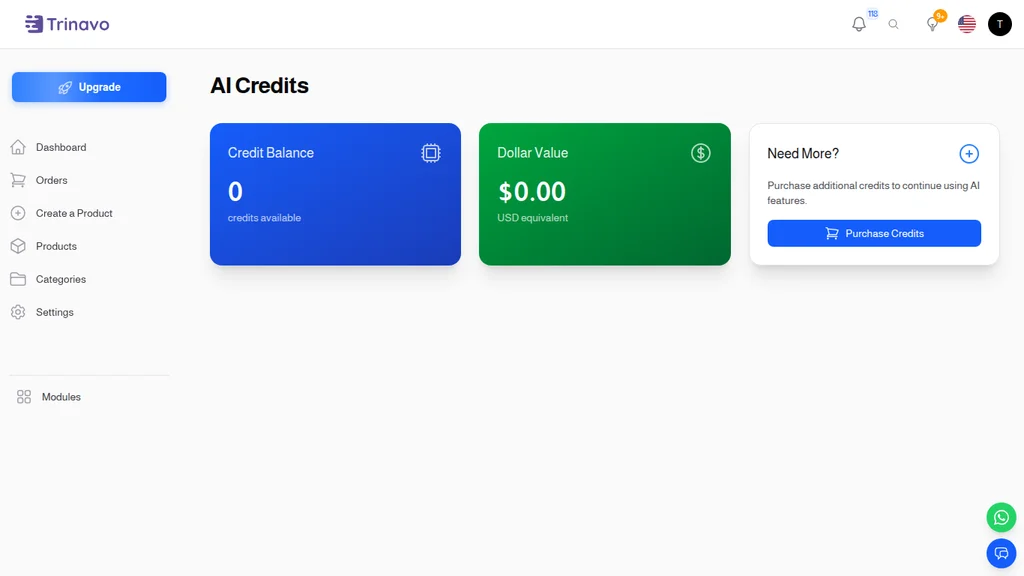
The AI Credits dashboard lives in your admin panel as a dedicated page. At a glance it shows you three things:
- Credit Balance — how many credits you have available right now
- Dollar Value — what your remaining credits are worth in USD equivalent, so there's no mental math
- Purchase Credits — a direct link to top up whenever you're running low
Why credits instead of a subscription?
Most stores don't use AI every day. You might write 30 new product descriptions in a launch week, then barely touch the AI for a month while you focus on orders and customer service. A subscription charges you the same every month whether you use it or not. Credits only move when the AI actually does something for you.
Credits are also transparent. Before you launch any AI task — like enriching a whole category of products — Trinavo shows you the estimated credit cost up front. You can cancel if it looks too expensive, or proceed knowing exactly what it'll cost. There are no hidden fees, no overage penalties, and no throttling if you run busy for a week.
What counts as a credit?
Each AI action has a published cost. Writing a short product description is cheap. Rewriting the descriptions for 500 products at once costs more — but you see the total before you confirm. Enriching products with images, long descriptions, and SEO metadata costs slightly more than just generating text. The dashboard keeps a running total so you can see where your credits are going.
When you run low, a purchase button takes you straight to the Trinavo marketplace where you can buy more in a few clicks. Credits never expire, so stocking up during a sale is always a good idea.
AI Content Writer — Descriptions That Actually Sell
Writing product descriptions is one of the most time-consuming parts of running a store. It's also one of the highest-leverage: a well-written description can double your conversion rate on the same product. Trinavo's AI Content Writer generates professional, SEO-aware copy for your products in seconds.
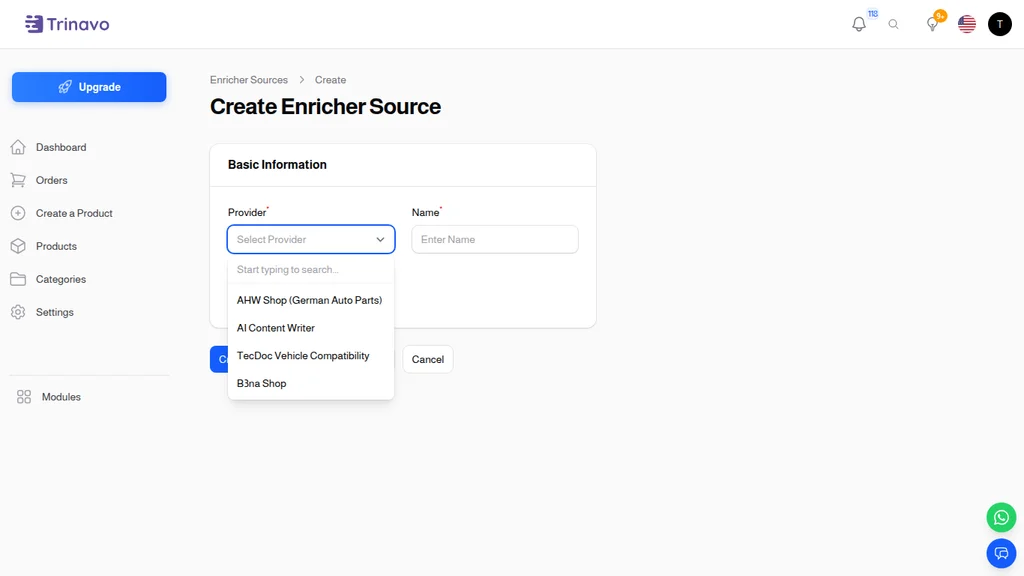
The Content Writer shows up as a provider when you configure an enrichment source — alongside third-party data providers like AHW Shop or TecDoc. It sits in the same list because it does the same job from a workflow perspective: it fills in product information that would otherwise take you hours to write by hand.
What the AI Content Writer generates
When you run the Content Writer on a product (or batch of products), it can produce:
- Short descriptions — the 2–3 sentence pitch that appears in product listings and search results
- Long descriptions — the detailed product page copy with features, benefits, and use cases
- Meta titles — search-engine-optimized page titles that match what shoppers type into Google
- Meta descriptions — the snippet that shows under your store in search results
- Meta keywords — relevant search terms for internal search and metadata
Every piece of generated content is stored as a draft. You review it, edit it, and only then does it go live. Nothing is published automatically without your approval — your brand voice stays consistent.
How it knows what to say
The AI Content Writer uses several signals to generate accurate, on-brand copy:
- The product name — your starting point for what the AI describes
- Existing product attributes — if you've set a brand, category, price range, or specifications, the AI factors those in
- Product images — when configured, the AI can analyze product photos to describe visual details
- Store context — your category structure, existing descriptions, and brand terminology help the AI match your tone
You can also provide custom prompts and instructions. If your store uses a specific tone ("casual and friendly" or "formal and technical"), you can configure that once and every generated description will match.
Running the Content Writer at scale
For a new store with 500 products, opening each product one by one to write copy is a week of work. The Content Writer can handle the whole catalog in a single batch job:
- Select the products you want to enrich
- Choose which fields to generate (descriptions only, or full SEO package)
- Preview the estimated credit cost
- Launch the job
The job runs in the background. You get a notification when it's done, and every generated field sits in a review queue. You can bulk-approve, edit individual products, or regenerate anything that doesn't quite hit the mark.
AI Product Enrichment — Beyond Descriptions
Product enrichment is about filling in everything you didn't have time to capture when you first created a product. The first version of a product listing is usually skeletal: a name, a price, a rough category, maybe one image. That's fine for getting a catalog online, but it's not fine for ranking on Google or converting visitors.
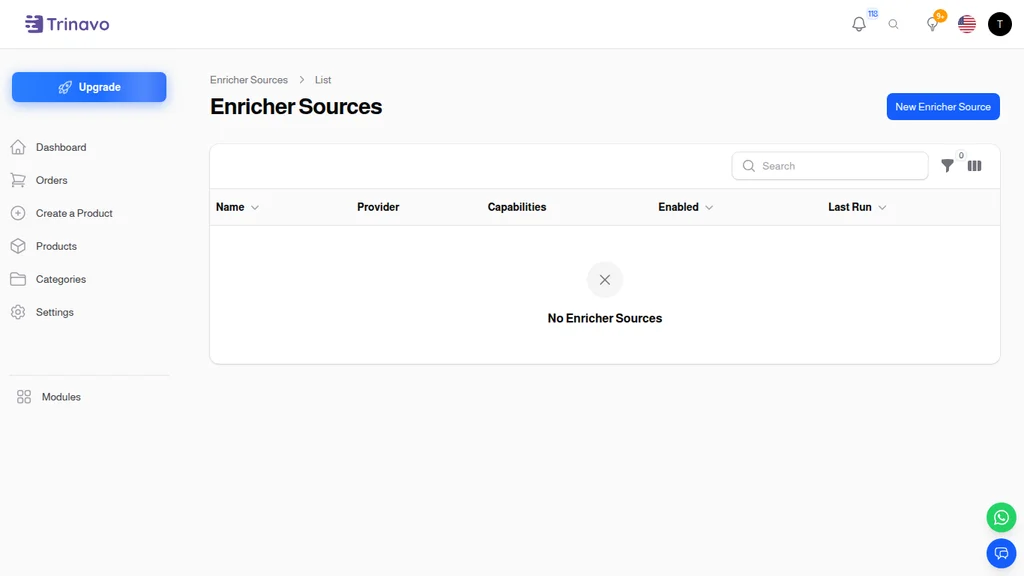
The Enricher Sources page is where you configure the AI (and other data sources) that will enrich your products. You can have multiple sources active at once — for example, the AI Content Writer for copy plus an industry-specific database like TecDoc for auto-parts compatibility data.
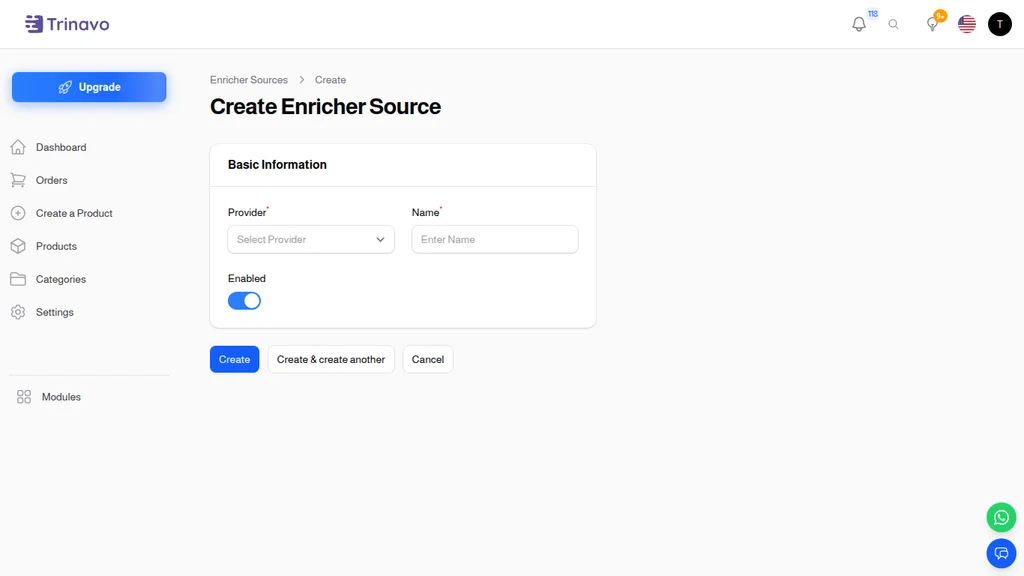
Setting up a new enricher takes about thirty seconds:
- Provider — pick from the available list (AI Content Writer, TecDoc, B3na Shop, AHW Shop, and more as Trinavo adds partners)
- Name — a label so you can tell multiple enrichers apart
- Enabled — toggle on to activate, toggle off to pause without losing configuration
Each provider has its own settings screen after you pick it — for the AI Content Writer that includes the tone, language, length, and which fields to populate. For third-party data providers, it's usually an API key and some filtering rules.
What product enrichment looks like day-to-day
Once your enrichers are configured, enrichment becomes part of your everyday workflow. You'll typically use it in three scenarios:
New product launch — you create a product with just the essentials, then run enrichment to fill in descriptions, SEO fields, and any provider-specific data (like vehicle compatibility for auto parts).
Migration from another platform — you import a product catalog from a spreadsheet or another store and the descriptions are all wrong or missing. One batch enrichment pass cleans up the whole catalog.
SEO refresh — every six months or so, search trends shift. You run the AI Content Writer on a batch of products to refresh the meta titles and descriptions with current keywords and phrasing.
Controlling what the AI changes
You don't have to let the AI overwrite everything. Each enrichment run can be scoped to:
- Only empty fields — the AI only fills in blanks, never touches anything you've written yourself
- Specific fields — generate meta titles but leave long descriptions alone, for example
- Selected products — enrich just the products that need it, not the whole catalog
This granular control is what makes AI enrichment actually useful instead of scary. You can experiment with a batch of 10 products, see if you like the output, and then decide whether to run it on the remaining 490.
AI Category Restructuring — A Cleaner Catalog in Minutes
Categories are the backbone of how customers navigate your store. A well-organized category tree means shoppers find what they want quickly and discover related products they didn't know they needed. A messy category tree does the opposite: customers bounce, conversions drop, and your site search has to paper over structural problems.
The hard part is that categories rarely start messy. They grow messy over time. You add a "Summer Collection" one year, then "2024 Summer" the next, then "Beach Wear," and suddenly you have three overlapping categories and no one remembers which products belong where. Cleaning this up manually means reading every category, comparing them side by side, and making dozens of judgment calls.
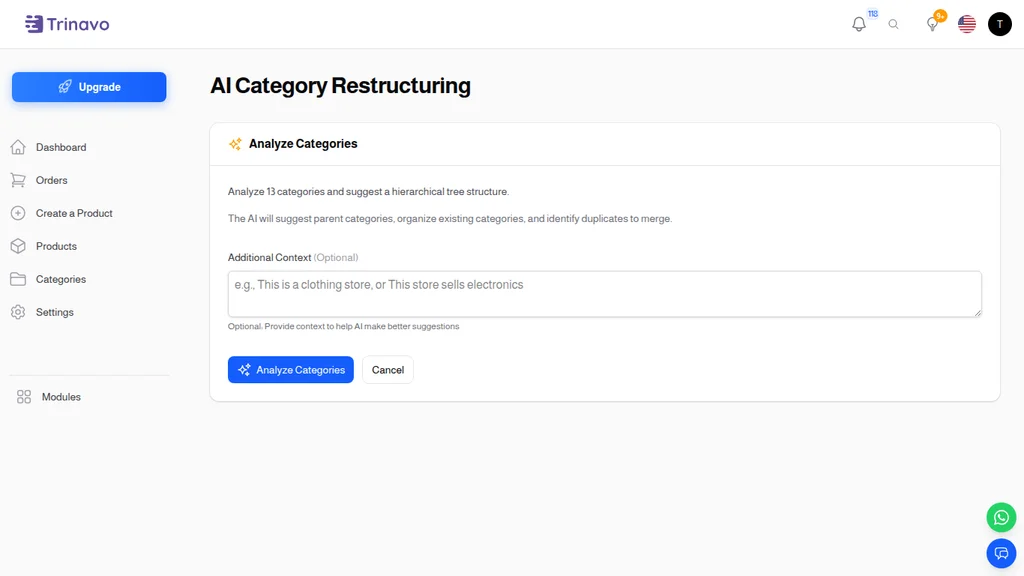
AI Category Restructuring reads your entire category tree in seconds and proposes a cleaner structure. It's not a black box — you see every suggested change before anything is applied.
What the AI analyzes
When you run category restructuring, the AI looks at:
- Category names — finding duplicates, overlaps, and unclear labels
- Product counts per category — spotting empty categories and oversized ones
- Category hierarchy — identifying categories that should be nested under a parent
- Semantic similarity — catching cases where two categories describe the same thing with different words ("Men's Shoes" and "Male Footwear")
The Additional Context field
You know things about your store that the AI doesn't. The Additional Context field lets you tell the AI anything it needs to know before it suggests changes. Examples of useful context:
- "This is a clothing store focused on women's wear, men's items are a small side category"
- "We sell electronics and accessories; 'Accessories' should stay a top-level category even if it's small"
- "We're planning to expand into home goods next quarter — leave room in the structure"
The more context you give, the better the suggestions. The AI will then produce a restructuring plan tailored to your business, not a generic one-size-fits-all template.
Reviewing the suggestions
The AI doesn't change anything automatically. After it analyzes your tree, you see a preview of the proposed structure side by side with your current one. For each change — a merge, a rename, a new parent category, a move — you can:
- Approve — the change gets applied when you confirm the batch
- Reject — the change is skipped, your current structure is kept
- Edit — tweak the AI's suggested name or placement before approving
Once you're happy with the plan, one confirmation button applies everything at once. All product assignments are preserved — the AI only changes the category structure, never moves products around without telling you.
When to run it
Most stores run category restructuring:
- After a big catalog import
- Once or twice a year as a "spring cleaning"
- When preparing for a rebrand or a site redesign
- When site search shows a lot of "no results" pages (a symptom of category confusion)
It's a tool you reach for occasionally, not daily. But when you do reach for it, it saves hours of tedious comparison work.
How the Four Tools Fit Together
The AI Suite isn't four separate products — it's one system with four surfaces. They share:
- A single credit pool so you're never juggling multiple balances
- A single configuration model — set your tone and language once in the Content Writer and the same style applies to Category Restructure suggestions
- A single review queue for human-in-the-loop approval
- A single permission model so you can give staff access to, say, description writing but not category restructuring
The typical workflow for a growing store looks like this:
- Week 1 (catalog setup) — import products, run Category Restructure to clean up the imported tree, run Content Writer on the whole catalog to generate descriptions and SEO
- Ongoing (new products) — whenever you add a product, it passes through the enricher pipeline automatically and lands in the review queue with full content ready to approve
- Quarterly (SEO refresh) — batch-run Content Writer on meta titles and descriptions to keep up with search trends
- Yearly (structural review) — re-run Category Restructure to catch drift and keep navigation sharp
The AI does the repetitive, high-volume work. You do the strategic, brand-level work. That's the split that makes the AI Suite worth using.
Privacy and Data Handling
Any time you send product data to an AI, the natural next question is: what happens to that data?
Trinavo's AI Suite is built on the principle that your catalog is yours. Product descriptions, category names, and other content you generate with the AI:
- Are not used to train public AI models
- Are not shared with other Trinavo merchants
- Live in your store's database like any other content
- Can be deleted at any time, along with their generation history
When credits are spent, what you pay for is the compute to generate text or analyze structure — not a license to your data. This matters especially for stores in regulated industries or with proprietary product information.
Getting the Most Out of the AI Suite
A few practices separate stores that love the AI Suite from stores that merely tolerate it:
Start small. Don't turn on Content Writer for 1,000 products on day one. Try it on 10, review the output, tune the tone settings, then go bigger.
Tune the tone. The default tone is clear and professional. If your brand voice is playful, casual, technical, or luxurious, set that in the Content Writer settings before running a batch. A five-minute configuration upfront saves hours of editing later.
Review, don't rubber-stamp. The AI is a drafting assistant, not a replacement copywriter. Skim every generated description. Fix the one in twenty that misses the product's key selling point.
Use the context field for Category Restructure. A vague prompt produces a generic tree. A specific prompt ("we're a specialty tea shop, organize by caffeine level and origin") produces a tree that matches how your customers actually think.
Top up credits during sales. Trinavo occasionally discounts credit bundles. Stocking up during a sale is the cheapest way to run AI on a large catalog.
Re-run quarterly. Your products, your categories, and search trends all drift. A scheduled quarterly refresh keeps your catalog sharp without ever becoming a panic project.
The Bottom Line
The AI Suite is the difference between an online store that looks like it was built by a real business and one that looks like it was thrown together in a weekend. Good descriptions, clean categories, and well-optimized SEO used to take a dedicated content person months of work. With the AI Suite, one founder with a laptop can ship a polished, search-friendly catalog of thousands of products in a week — and keep it sharp forever with periodic refreshes.
Credits are predictable. Suggestions are always reviewable. And every feature is designed around the same principle: the AI handles the volume, you handle the judgment. That's the partnership that works, and it's what makes the AI Suite one of the most time-saving features in the entire Trinavo platform.