
The Single Biggest Leak in Every Online Store
Around 70% of shopping carts on the average e-commerce site never become orders. Customers add items, get distracted, get interrupted, get cold feet, or hit some friction at checkout, and just... leave. The items sit in the cart until they expire. The sale never happens.
That 70% is not a rounding error. It's the biggest revenue leak in the business — the difference between the business you have and the one you could have with the same traffic. Recapturing even 10% of abandoned carts can be the difference between break-even and profitable.
Trinavo's Abandoned Cart Recovery system turns that leak into a recovery channel. Every cart on your store is tracked automatically. Carts that go inactive get flagged as abandoned. You can send customers automatic email reminders on a schedule you define — one reminder, three reminders, or a carefully timed sequence like "1 day, 3 days, 7 days." Admins can monitor every cart in real time, spot patterns, and intervene on high-value carts manually.
All of this is built-in. No third-party service, no separate email platform, no integration work. The cart data you already collect becomes the foundation of a recovery system that runs itself.
How Cart Tracking Works
Every time a customer (or even a guest) adds an item to their cart, Trinavo creates a cart record. Over the lifetime of that cart, one of four things happens to it:
- Active — the customer is currently shopping and the cart is alive
- Abandoned — the customer has gone inactive but the cart hasn't expired yet; this is the recovery window
- Expired — the cart has exceeded its configured expiry date; items are released back to inventory, and the cart is no longer visible to the customer
- Converted — the cart was turned into an order; the record is retained for analytics
The clock starts ticking from the last activity on the cart — adding an item, changing quantity, or updating the cart. If the clock runs out without an order being placed, the cart progresses through abandoned into expired.
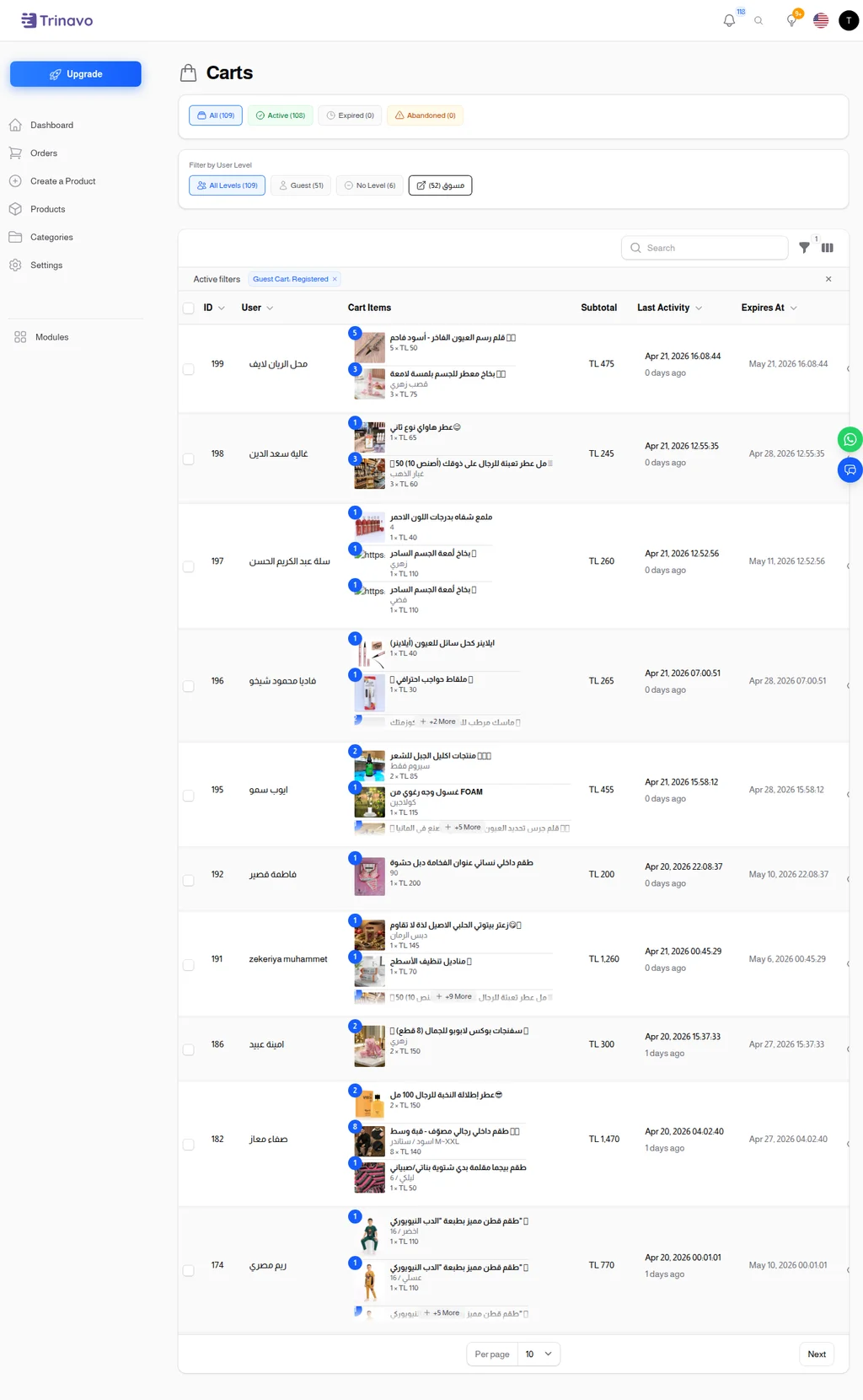
The Carts admin page shows every cart in your store. At the top, four status pills let you filter instantly: All, Active, Expired, and Abandoned. Below that, user-level filters let you narrow to specific customer segments — Guest, No Level, or any loyalty tier you've configured.
Each cart row displays:
- ID — the cart identifier
- User — the customer (or "Guest" for unauthenticated carts)
- Cart Items — thumbnails and names of products, with quantities and prices
- Subtotal — total cart value
- Last Activity — when the customer last touched the cart, with a relative "X days ago" hint
- Expires At — the auto-expiration timestamp
This single view is valuable on its own. You can see at a glance what your abandonment rate looks like, which products are high-abandon, and which customers are repeat abandoners (often the best recovery targets).
Cart Settings — The Recovery Controls
The behavior of the abandoned cart system — how long carts live, whether reminders are sent, and on what schedule — all lives on one settings page.
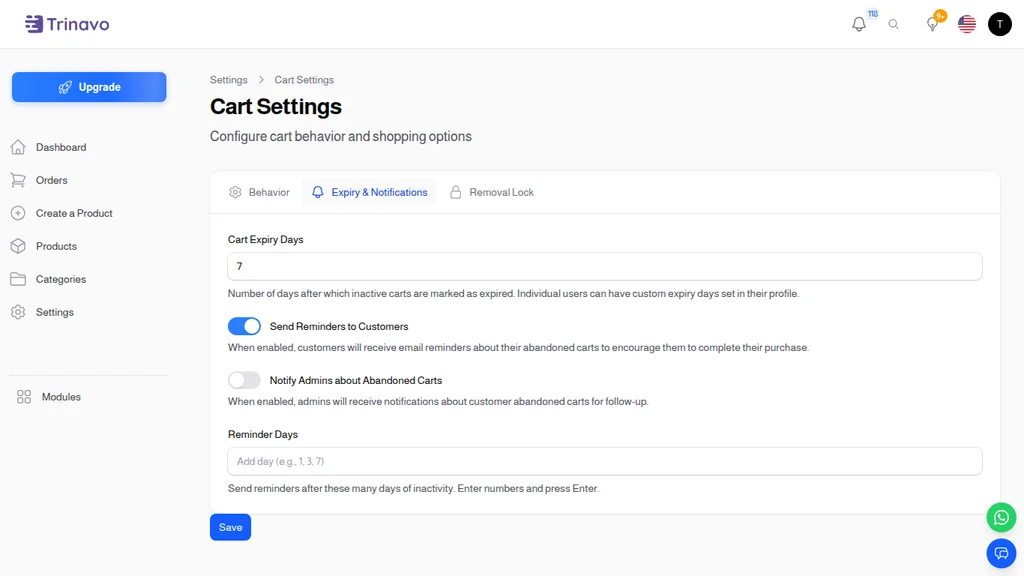
The Cart Settings page has three tabs; the Expiry & Notifications tab is where recovery lives. The key controls:
Cart Expiry Days
The master lifespan setting. After N days of inactivity, a cart is automatically marked as expired. The default is 7 days, which is a sensible starting point: long enough to give customers a window to come back, short enough to release held inventory for fast-moving products.
Individual users can have custom expiry days set in their profile — useful for VIP customers or specific scenarios where you want carts to persist longer. For most stores, the global 7-day default works across the board.
Send Reminders to Customers
The top-level toggle. When enabled, abandoned carts trigger email reminders to the customer on the schedule defined below. When disabled, carts still get tracked and still expire, but customers aren't messaged — useful if you prefer to send recovery emails via a separate tool or just want to silently track abandonment patterns.
Notify Admins about Abandoned Carts
A parallel toggle for you. When enabled, you get internal notifications every time a cart abandons, so your team can follow up manually on high-value ones. Small stores often use this for personal outreach — a founder personally emailing a customer about a $500 cart converts at rates that no automated email can match.
Reminder Days
A list of days on which reminder emails get sent, counted from the last activity on the cart. Common configurations:
1, 3, 7— a classic sequence: gentle reminder at day 1, nudge at day 3, final "last chance" at day 72, 5— lighter touch, two reminders spaced to feel helpful not pushy1— single reminder the day after abandonment; simplest, lowest risk of annoyance
Pick the cadence that fits your brand's email tone. Three reminders maximize recovery but risk unsubscribes if the brand is sensitive to over-emailing. One reminder captures the majority of the recoverable revenue with minimal annoyance cost.
The Recovery Email Flow
When the reminder schedule triggers, an email goes out to the customer with a link back to their cart. The cart is still there, items preserved, waiting to be checked out. The customer clicks, the cart loads, they complete the order. That's it.
A few nuances worth understanding:
Guest carts get reminded too if the guest provided an email at any point (checkout start, email subscription, etc.). Guest cart recovery is often higher-value than you'd expect because guests are usually first-time visitors you'd otherwise lose forever.
Carts that get modified reset the clock. If a customer abandons a cart, gets a reminder, adds another item, then abandons again, the abandonment timer resets. They won't get hit with a second reminder on the same item-addition cycle.
Converted carts stop the sequence. If a reminder is queued but the customer completes checkout before it fires, the reminder gets canceled automatically. No "complete your order" email arriving the day after they already ordered.
Expired carts don't get reminded. Once the cart crosses the expiry threshold, it's considered lost. The reminder window is between abandonment and expiration only.
What to Put in the Recovery Email
The email template is configurable, and the best-performing templates share some traits. A short checklist of what to include:
The cart itself. Show the exact products the customer left behind, with images. Seeing the specific shoes they were shopping for is far more persuasive than a generic "you left stuff in your cart" message.
A clear recovery link. One big button that takes the customer back to the cart, logged in if possible so there's zero friction to continuing.
Low-pressure copy. "Forgot something?" beats "DON'T MISS OUT!" — customers abandon for legitimate reasons, and hectoring them feels desperate. The email should feel like a helpful reminder from a friend, not a sales pitch.
An optional incentive. For the final reminder in a sequence (e.g., day 7), consider a small discount code — 5% off, free shipping, etc. Earlier reminders don't need this; saving it for the last reminder keeps customers from training themselves to abandon just to get the discount.
Brand consistency. The email should look like a genuine message from your brand, not a generic template. Headers, fonts, voice — all should match your main marketing emails.
Cart Statuses in Depth
Knowing how the four statuses interact is useful for building your recovery strategy:
Active
The customer is currently engaged. No intervention needed. Let them shop.
Abandoned
The customer hasn't interacted with the cart recently, but the cart still exists. This is where recovery happens. Most stores see 10-20% recovery rates from automated emails, and higher with personal outreach on high-value carts.
Expired
The cart has exceeded its expiry date. Items are released back to inventory (important for limited-stock products), and the cart is no longer accessible to the customer. Expired carts are effectively lost — they stay in the admin list for analytics but aren't actively recoverable.
Converted to Order
The cart became an order. The cart record stays linked to the order so you can trace back exactly what was in the cart before checkout. This is useful for understanding order journeys and for customer service ("I meant to add those earrings, can you check my original cart?").
Filtering and Analyzing
The Carts admin page supports detailed filtering that becomes valuable once you have volume:
Status filter
Filter by status pill at the top — active, abandoned, expired, converted — to focus on a specific group. "Show me all abandoned carts from the last 7 days" is often the starting point for a manual recovery session.
User Level filter
Filter by loyalty tier. Abandoned carts from Platinum customers are more valuable than from new customers, and often warrant personal outreach. A $200 cart from a Platinum customer who's spent $10,000 over the past year is worth a phone call.
User filter
Search for a specific customer to see their cart history — useful during support conversations when a customer says "I had items in my cart."
Has Items / Expired filters
Exclude empty carts from your view (they're rarely actionable) and toggle between expired and non-expired to focus on the recovery window specifically.
Exporting
All filtered cart data can be exported for analysis in spreadsheets or integration with your BI tools. Weekly abandoned-cart exports become the input to your marketing team's follow-up campaigns.
Recovery Rates — What to Expect
Realistic expectations help you set the right cadence:
- One reminder email (day 1): recovers 3-8% of abandoned carts
- Two-email sequence (day 1, day 3): recovers 8-15%
- Three-email sequence (day 1, day 3, day 7, with incentive on last): recovers 15-25%
- Personal outreach on high-value carts: can hit 40-60% recovery for carts over a certain threshold
These numbers vary by industry, product type, and email deliverability. A fashion store with strong brand loyalty recovers better than an impulse-buy store. A B2B store with considered purchases can see three-email sequences convert at 30%+. Your first goal is to establish a baseline with a simple sequence, then iterate based on the data.
Everyday Workflows
Once the system is running, it becomes part of a few specific routines:
Weekly abandonment review. Every Monday, open the Carts page filtered to Abandoned for the past week. Skim for anomalies — a sudden spike in abandonments might signal a checkout bug. Look for patterns — are specific products getting abandoned at unusual rates? Those products might have a pricing or descriptions issue.
High-value manual outreach. Filter carts over a certain value (say, $200+) and assign them to a sales rep for personal follow-up. The ROI on a 15-minute personal email to a VIP with a big cart is usually stunning compared to any other sales activity.
Post-launch monitoring. Just launched a new product or campaign? Watch the cart list in real-time for the first few hours. If carts with the new product are abandoning at elevated rates, you'll see it before the daily reports do and can fix whatever's wrong.
Seasonal adjustments. Before big sales (Black Friday, etc.), extend Cart Expiry Days temporarily so carts survive the shopping rush. After the rush, tighten it back up to release inventory.
Support conversations. When a customer writes in confused about a past cart, the Carts page lets you pull up their history instantly. "Yes, I can see you had 3 items in your cart on March 15, totaling $120. Here's a link to restore them."
The Bottom Line
Abandoned cart recovery is the single highest-ROI automation in e-commerce. The traffic is already bought, the customer already wanted the product enough to add it, and the margin on a recovered sale is identical to a normal sale. All you're doing is capturing revenue that was otherwise lost to distraction.
Trinavo's built-in Abandoned Cart Recovery system means this revenue capture requires no external tool, no separate email platform, and no integration work. Enable reminders, pick a cadence, and a background process quietly turns abandonments into orders around the clock.
The stores that master this one workflow consistently outperform their direct competitors on the same traffic. It's not a secret — it's just a discipline. And Trinavo makes the discipline as simple as filling out one settings page.