
Turning Buyers Into Regulars
Acquiring a new customer costs five to seven times more than keeping one. That's not a marketing cliché — it's a fundamental truth of running a sustainable online store. Your best customers aren't the first-time visitors chasing a discount; they're the regulars who come back month after month because they trust your brand.
Trinavo's Loyalty Program is how you reward those regulars in a way that makes them even more loyal. It's a complete points-and-tiers system built directly into your store: customers earn points for the things you value (purchases, reviews, sign-ups), climb through tiers based on how much they spend, and unlock real perks like automatic discounts, bonus points, and exclusive badges.
Setting it up takes about fifteen minutes. The returns compound for years.
How the Loyalty Program Works
At its heart, the loyalty program has three moving parts:
- Points — the currency customers earn through their actions in your store
- Levels (Tiers) — the status customers reach based on their monthly spending
- Rewards — the perks, discounts, and bonuses customers get for their loyalty
These three pieces connect seamlessly. A customer buys a product, earns points, and their monthly purchase total counts toward the next tier. When they hit the tier threshold, their rewards upgrade automatically — no coupon codes, no manual management, no customer service intervention needed.
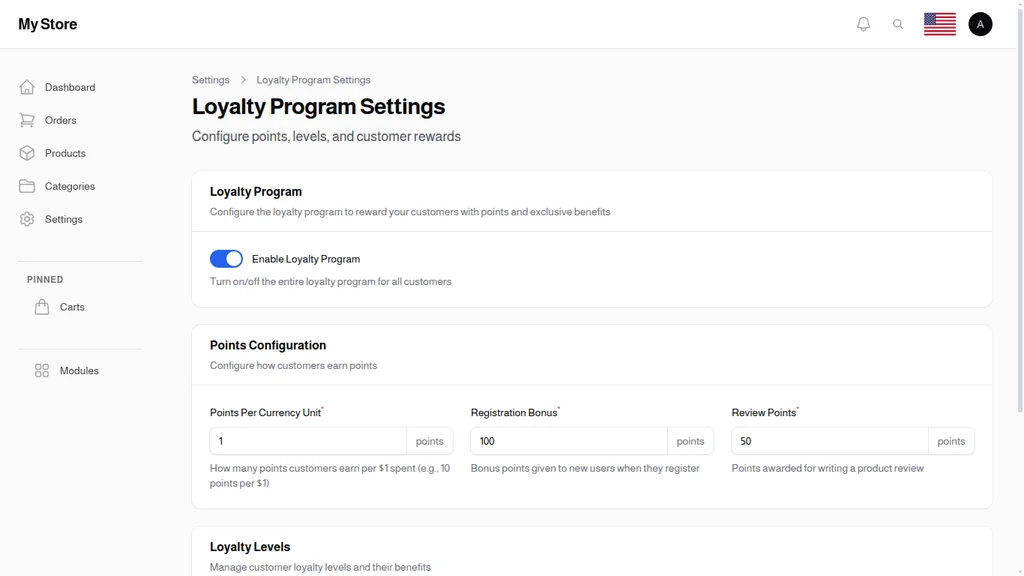
The Loyalty Program Settings page is where everything begins. Three configuration blocks control the behavior of your program: Loyalty Program (on/off), Points Configuration (how customers earn), and Loyalty Levels (how tiers work).
Configuring Points
Points are the currency of your loyalty program. Customers accumulate them, track them, and eventually redeem them. Your job is to decide how generously they earn.
Points Per Currency Unit
This is the exchange rate between spending and points. Set it to 1 and customers earn 1 point per $1 spent. Set it to 10 and they earn 10 points per $1. The ratio itself isn't what matters — what matters is the perception it creates.
A customer who sees "+1,165 points earned on this order" feels more rewarded than one who sees "+11 points," even if the monetary value is identical. Most stores land somewhere between 1 and 10 points per currency unit. The higher multiplier feels more generous without actually costing you more.
Registration Bonus
New customers get a welcome gift of points the moment they create an account. The default is 100, which works well as a nudge toward a first purchase — 100 points often translates into a small but meaningful discount.
The registration bonus has two jobs: it gives new accounts a reason to convert to a first order, and it signals to shoppers that they're entering a store that values loyalty. A visible "+100 points" notification on sign-up does more for conversion than a generic "Welcome!"
Review Points
Reviews are gold. They build social proof, help SEO, and reduce return rates. But most shoppers won't leave one unless there's a reason. Review Points is that reason.
The default is 50 points per review — enough to motivate without being so generous that it incentivizes low-quality reviews. Combined with a post-purchase email asking for a review, this single feature can lift your review volume by 3–5x.
Loyalty Levels — Tiered Rewards
Points alone are a flat system: everyone earns at the same rate, everyone redeems the same way. Tiered levels create something more powerful — a status game where customers aspire to climb.
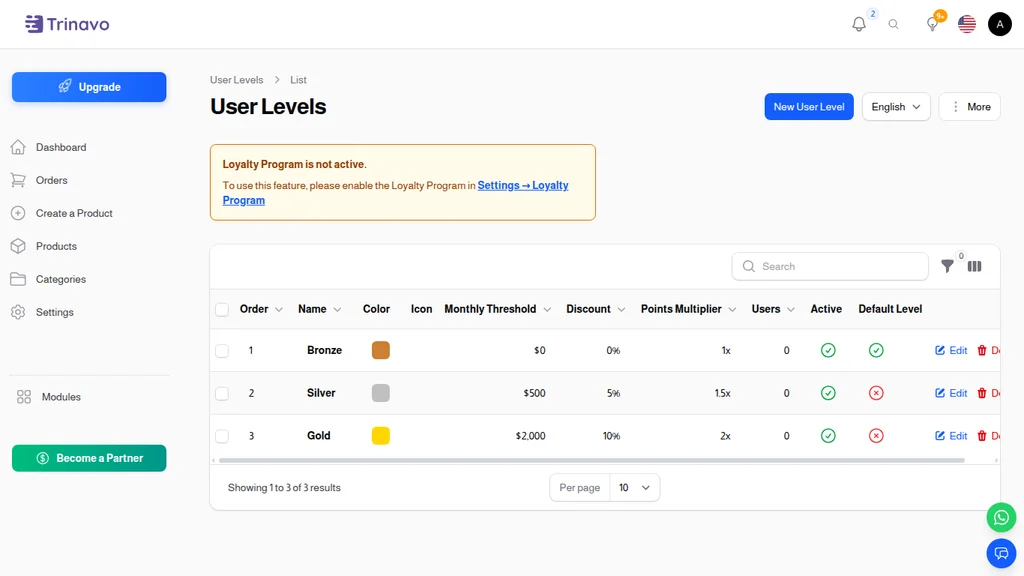
The User Levels page shows every tier you've configured, sorted by order. For each level you see:
- Order — display position (lower numbers come first)
- Name — the tier label your customers see (Bronze, Silver, Gold, Platinum — or whatever fits your brand)
- Color — a badge color so the tier is visually distinct
- Monthly Threshold — the minimum spending required to reach this tier
- Discount — the percentage discount applied to every product for this tier's customers
- Points Multiplier — how fast this tier earns points (1x default, 2x for a premium tier, etc.)
- Users — how many customers currently sit at this level
- Active — whether the tier is currently live
Creating and Editing a Level
Clicking into a level reveals four configuration tabs that control every aspect of how the tier behaves:
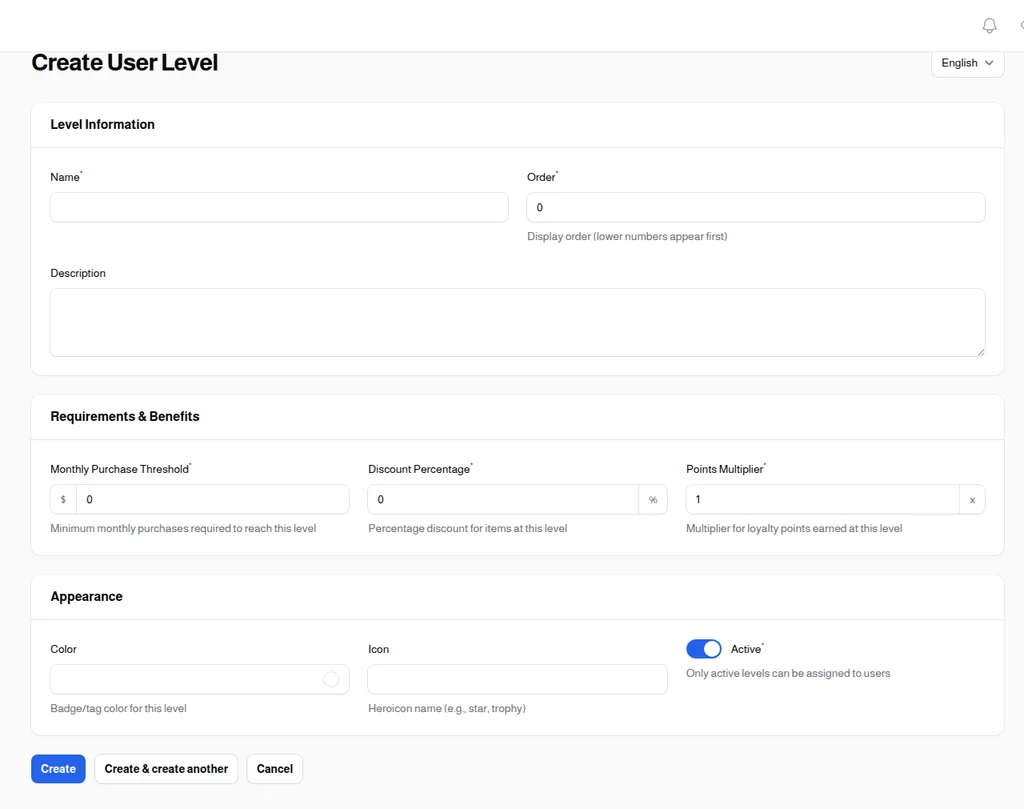
- Level Information — the name, sort order, and internal description
- Requirements & Benefits — the monthly spending threshold, the discount percentage, and the points multiplier
- Appearance — the badge color and an optional icon that appears on customer profiles
- Payment Methods — optional tier-exclusive payment options (e.g., only Gold customers can pay on account, or only VIPs get access to installment plans)
How customers move between tiers
Trinavo tracks each customer's monthly purchase total automatically. At the end of each billing period, customers move up to the highest tier their spending qualifies them for. If spending drops in a subsequent month, they move back down — unless you configure "sticky" tiers that hold for longer periods.
This automatic movement is what makes tiers work. Customers see themselves inching toward the next level and naturally spend a bit more to get there. It's a gentle, non-pushy form of upselling that feels like a reward rather than a sales pitch.
A typical tier structure
Most stores start with three tiers plus the default "no tier" starting state:
- Starter — anyone with an account, no monthly threshold
- Silver — $100+/month, 5% discount, 1.5x points
- Gold — $500+/month, 10% discount, 2x points
- Platinum — $2,000+/month, 15% discount, 3x points + free shipping
You can add or collapse tiers over time. Starting simple and expanding as data accumulates is usually the right approach.
Loyalty Transactions — Complete Audit Trail
Every time a customer earns or spends a point, Trinavo records it. The Loyalty Transactions page is the single source of truth for every points movement in your store.
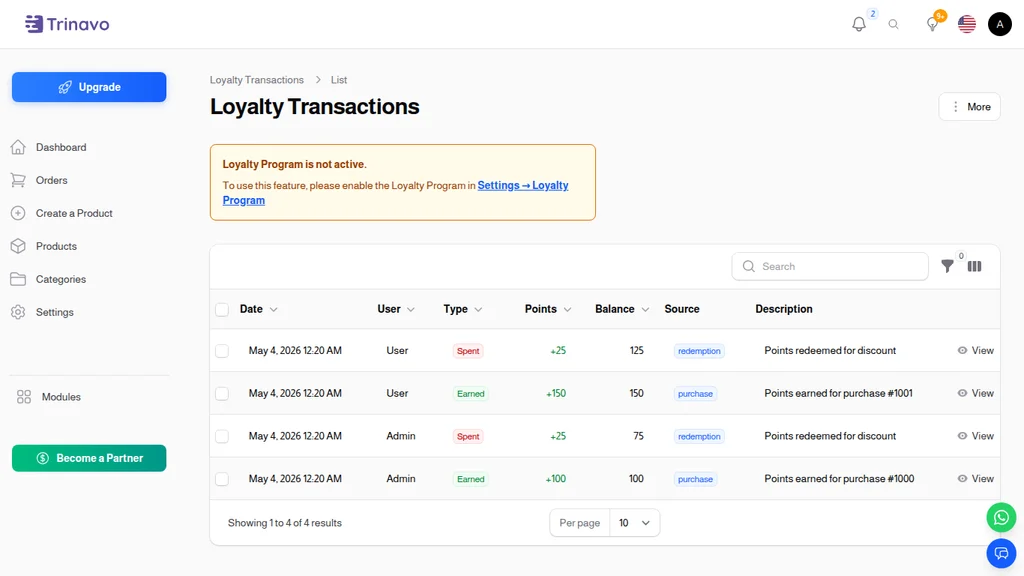
The list shows date, customer, transaction type, points added or deducted, running balance, source (what triggered the transaction), and description. You can filter by type, by user, by source, and by date range — essential when a customer messages support asking why their balance changed.
Transaction types
- Earned (green) — points added to the balance from a qualifying action
- Spent (red) — points redeemed by the customer at checkout
- Adjusted (yellow) — a manual correction applied by an admin
- Expired (gray) — points that reached their expiration date without being redeemed
Transaction sources
- Purchase — the most common source, points earned from completed orders
- Review — points awarded for submitting a product review
- Registration — the welcome bonus for new accounts
- Manual (Admin) — staff-issued adjustments (e.g., making a customer whole after a support issue)
This granular audit trail matters more than it sounds. It's what lets your support team confidently answer "why did my balance change?" questions in seconds. It's what lets you verify the program's ROI. And it's what keeps you out of trouble if a customer ever disputes a transaction.
Points at Checkout
The real moment of delight for a customer isn't earning points — it's spending them. At checkout, customers see their available balance and choose how many points to apply. Points convert to a currency discount using the same ratio you set for earning.
This two-way exchange is what separates loyalty programs that feel like real money from programs that feel like gimmicks. When a customer can say "I earned 2,000 points over the last three months, that's $20 off my next order," the program has done its job.
Controlling redemption
You can configure:
- Minimum points for redemption — prevent tiny redemptions that feel insubstantial
- Maximum percentage of order paid with points — cap the discount at, say, 20% so points don't cannibalize cash sales entirely
- Products eligible for points redemption — exclude already-discounted items or gift cards
These levers let you tune the program for your margin structure. A high-margin boutique might let customers pay 100% in points. A thin-margin electronics store might cap it at 10% — still meaningful to customers, still profitable for you.
Everyday Workflows
Once the program is running, the Loyalty section of your admin panel becomes something you visit in a few specific situations:
Monthly tier review — once a month, glance at the User Levels list to see how customers are distributed across tiers. If 95% of customers are still at the starter level, your thresholds might be too high. If everyone's in Platinum, they're too low.
Support ticket investigations — when a customer asks why their balance changed, open Loyalty Transactions and filter by their name. You'll see every point movement in order.
Manual adjustments — a customer has a bad experience, a shipping mistake, or is an influencer you want to reward. Manually issuing bonus points is a tactic to have in your back pocket. The audit trail records who made the adjustment and when.
Campaign planning — before a promotion, you can run a "2x points weekend" or "500 bonus points on orders over $100." These short bursts spike engagement and are tracked cleanly in the transaction log.
Getting the Most Out of Your Loyalty Program
A loyalty program isn't "set it and forget it" — the programs that deliver the biggest ROI are tuned regularly based on data. A few habits separate successful programs from the ones that become forgettable features:
Make the points visible everywhere. The customer profile page, order confirmation emails, and checkout should all surface "you have X points" or "you just earned X points." Invisible points don't drive behavior.
Communicate tier progress. "You're $50 away from Silver" is a far stronger trigger than generic marketing emails. Trinavo can surface this in account pages and order confirmations.
Use review points aggressively. A post-purchase email that says "Leave a review and get 50 points" moves review volume dramatically. Make sure your review flow is one-click and low-friction.
Keep redemption accessible. If customers have to hunt for the "redeem points" option at checkout, they won't. Put it front-and-center on the checkout page.
Celebrate tier upgrades. When a customer moves from Silver to Gold, send an email. Include their new discount, their new points multiplier, and a short "thank you" note. The moment of tier upgrade is one of the highest-affinity moments in the customer relationship.
Don't let points sit forever. Consider a 12-month expiration on unused points. It's gentle pressure that drives redemptions (which drive repeat purchases) and limits your long-tail liability.
The Bottom Line
Stores that run a well-tuned loyalty program consistently see 20–40% higher lifetime value from their customer base compared to stores that don't. The math works because loyalty changes customer behavior in small, compounding ways: one extra order per year, one extra product per order, one extra year before churn.
Trinavo's Loyalty Program gives you every lever you need — points, tiers, rewards, transactions, audit trails — without any of the integration work. Enable it once, configure your points and tiers, and let the system quietly turn first-time buyers into lifelong customers.
The regulars who come back month after month aren't accidents. They're the result of a store that makes coming back worth it. That's what the Loyalty Program is for.