
The Most Trusted Marketing Channel You're Not Using
Every store owner knows the cheapest customer is the one who walks in because a friend told them to. Trust transfers. When your best customer tells their coworker "you have to try this store," that recommendation carries more weight than any Facebook ad you could ever run — and it costs you nothing.
But most stores don't actively reward that word-of-mouth. It happens sporadically, invisibly, without any way to amplify it or track its impact. The customers doing the recommending get no credit. The store never learns who the top advocates are. The channel runs on goodwill and nothing else.
Trinavo's Customer Referrals program fixes that. Every customer gets a unique referral link. Whenever someone registers through that link and places a paid order, the referring customer earns a percentage commission credited straight to their store wallet — for the lifetime of the referred account. No expiration windows, no manual tracking, no affiliate login systems, no coupon codes to copy and paste. Just a link.
The math is simple. The result is a marketing channel that runs itself, rewarded in real money, tracked to the cent.
How It Works End-to-End
The referral flow has five moving pieces:
- You enable the program and set a commission percentage
- Every logged-in customer gets a dedicated Referrals page with their personal link
- A new visitor clicks that link and the referrer is tagged on their session
- When the new visitor registers, they are permanently linked to the referrer
- Every paid order that new customer places credits the referrer's wallet automatically
There is no chase, no claim process, no monthly payout cycle. The commission lands in the wallet the moment the order is marked paid — the same trigger that awards loyalty points.
Enabling the Program
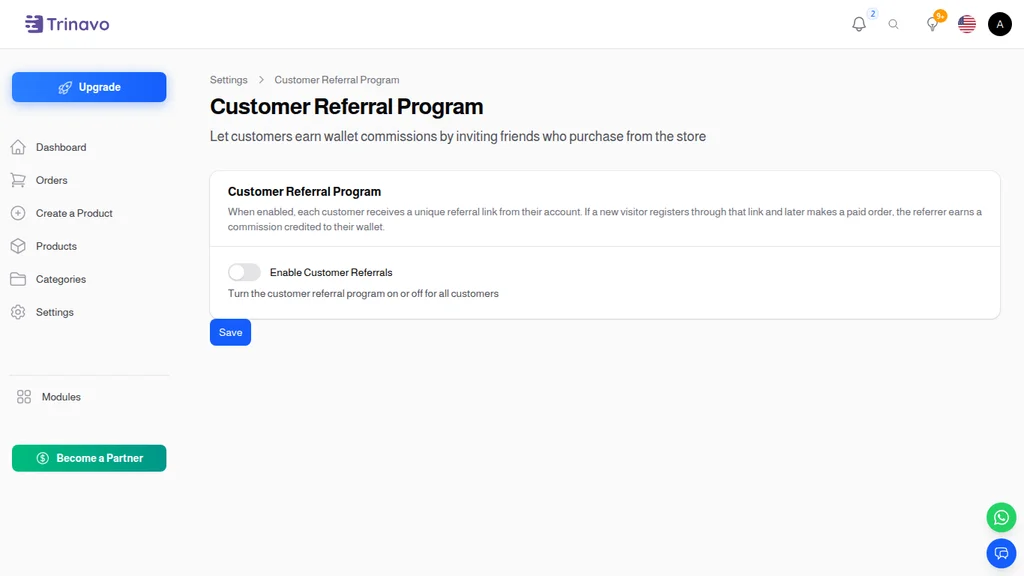
The Customer Referral Program settings page (Settings → Customer Referrals) has exactly two controls:
- Enable Customer Referrals — the master toggle that turns the program on or off for your whole store
- Commission Percentage — what fraction of each paid order the referrer earns (e.g. 5 means 5%)
Changes save immediately. Leave the program enabled for a month to let customers discover their referral pages, then turn it up or down based on what you see.
What the commission applies to
The commission is calculated on each paid order's items subtotal after product-level discounts. That's the part of the order that represents your actual product revenue. Delivery, tax, service fees, and payment-method fees are excluded from the base — they're pass-throughs that don't belong to you in the first place.
This matters for two reasons. First, it keeps your commission math honest: you're sharing a percentage of the revenue you actually keep, not revenue you pass through to shipping carriers and tax authorities. Second, it makes the commission predictable for your referring customers — they don't get confused by fluctuating totals that depend on shipping zones.
Choosing the right percentage
Most stores land somewhere between 3% and 10%. Higher than that and the program starts eating your margins on high-volume referrers. Lower and customers don't see enough reward to bother sharing. A few datapoints:
- 3–5% — good for high-margin categories (fashion, beauty, gourmet food) where even small percentages add up to meaningful amounts
- 5–8% — the sweet spot for most general merchandise stores; visible enough to motivate, modest enough to protect margins
- 8–10% — appropriate for high-ticket items (furniture, electronics) where a single referral can be a hundred dollars in commission
- Above 10% — reserve for launches, seasonal campaigns, or categories with unusually strong margins
You can change the rate any time. New commissions apply the new rate; existing wallet balances are not recalculated retroactively.
The Customer Experience
When the program is enabled, every logged-in customer sees a new Referrals link in their account menu. Clicking it opens a dashboard split into three tabs:
Referral Link tab
This is the first tab new users see. It displays the shareable URL (your-store.com/?ref=8CHARCODE), a one-click "Copy" button, and the customer's 8-character referral code. The code itself is what gets swapped for a nicer-looking tracking mechanism if you ever want to build branded short links for your top referrers.
The focus on copy-to-clipboard matters. Customers share referral links the same way they share YouTube videos: they copy, then paste into WhatsApp, Instagram, email, or Slack. Any friction at the copy step kills the flow. Trinavo's one-click copy is what makes sharing actually happen.
Profits tab
Active referrers land here by default. Five stat cards show at the top:
- Referred Users — how many people signed up through this customer's link
- Total Orders — how many orders those users have placed combined
- Total Earned — lifetime commission credited to the customer's wallet
- Last 7 Days — rolling weekly commission total
- Last 30 Days — rolling monthly commission total
Below the cards sits a paginated list of every commission transaction — positive earnings in green, refund reversals (more on that in a moment) in red. Customers can see exactly which order triggered which commission.
Users tab
The third tab lists every person the customer has referred. Each row shows the referred user, the count of paid orders they've placed, and the net commission earned from them specifically. This is powerful: customers start thinking of referrals as an ongoing relationship, not a one-time bounty. The friend who keeps buying month after month generates compounding commission, and the customer sees that number grow.
On mobile the cards scroll horizontally and the tables collapse into compact card layouts. The experience is designed to be glanceable — customers should be able to open the page during a coffee break and immediately know how their referrals are performing.
The Admin View
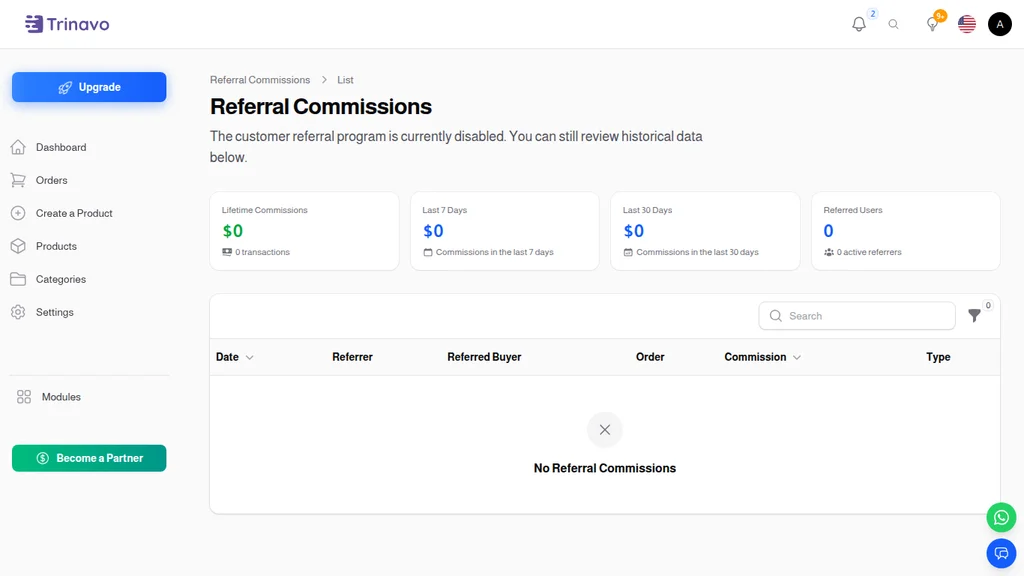
The Referral Commissions page in your admin panel (Marketing → Customer Referrals) shows every commission transaction across all customers. This is your single source of truth for how the program is performing overall.
Stats strip
Four headline metrics scroll across the top:
- Lifetime Commissions — every dollar paid out since the program started, net of any reversals
- Last 7 Days — last week's payouts
- Last 30 Days — last month's payouts, matched against the same period prior for trend visibility
- Referred Users — cumulative new accounts that signed up through a referral link, plus the count of active referrers driving them
Transaction list
Each row represents a single wallet movement: either an Earned credit when a referred customer's order gets paid, or a Reversed debit when a previously commissioned order gets refunded. Columns include the date, the referrer (clickable to open the user record), the referred buyer, the triggering order (also clickable), the commission amount, and a type badge.
Filters
You can slice the data by date range, by a specific referrer (search), or by transaction type. When investigating specific referrer performance or looking into a suspected duplicate, filters let you zero in quickly.
Even when disabled
If you turn the program off, the commissions list still loads and shows historical data — disabling only stops new commissions from being credited going forward. You never lose the audit trail.
Commission Rules — The Fine Print
Some specifics that matter for how the program behaves:
Lifetime, not time-boxed. A referred customer's orders generate commission forever, not just for 30 or 90 days. This is a deliberate design choice: customers share links with their inner circle, and that inner circle tends to be long-tail buyers. Capping the window would force repeated solicitations; unlimited tenure rewards the original share once and forever.
Idempotent credits. The same order cannot generate two commission entries, even if the order's paid event fires twice (webhook retries, manual re-payment, etc.). You won't have to reconcile duplicate commissions.
Refund clawback. If a paid order gets refunded, the commission previously credited is automatically reversed. A matching debit row lands in the referrer's wallet; the admin list shows it with a red Reversed badge. The reversal is idempotent per order — the same refund can't trigger two reversals.
Wallet can go negative. Reversals are allowed to take a wallet balance below zero. The commission may have already been spent on a previous order before the refund came in, so the program doesn't pretend the money is still there. The next commission a customer earns backfills the negative balance first.
Self-referrals are ignored. If the referred user signs up with the same email as the referrer, the commission is silently skipped. No abuse vector there.
Inactive referrers don't earn. If a referrer's account is disabled or deleted, their referred customers' orders stop generating commissions. Existing credited commissions aren't touched.
Wallet Integration
Commissions are real wallet credits, not ethereal "points" in a separate system. Each one creates a row in the standard Wallet Transactions list with:
- Reference Type:
customer_referral_commission - Reference ID: the order that produced the commission
- Description: "Referral commission for order #X"
Reversals follow the same pattern with a customer_referral_commission_reversal type. Customers can spend their wallet balance at checkout exactly like they'd spend a store credit — no special "referral bucks" tier that confuses the UI.
This integration is what makes the program feel real. Customers who've earned referral commission don't need to convert anything; the balance is already money they can put toward their next order. That immediacy is what separates referral programs customers actually engage with from ones that look impressive on a settings page but drive zero behavior.
How to Launch It Well
Turning the toggle on is step one. A few things separate programs that grow a business from programs that gather dust:
Announce it explicitly. The moment you enable the program, send an email to your customer base: "Good news — you can now earn money when you recommend us. Here's your personal link." Customers who don't know the program exists don't share.
Show the commission rate on the referrals page. Trinavo does this automatically. "Earn 5% of every friend's order, forever" is a compelling headline. Burying the rate behind a click loses the hook.
Reward your top referrers publicly. Every quarter, look at the Users stats tab and identify the 5–10 customers driving most of your referred signups. Send them a thank-you email, offer them a bonus percentage increase, or feature them on social media. Top advocates respond strongly to recognition.
Track the compounding effect. A referral program that's working shows a curve, not a spike. The first month is slow — only a handful of customers notice the feature. Month three onward, compounding kicks in: referred customers themselves become referrers, and growth starts stacking. Don't judge the program on week-one numbers.
Pair with a first-order discount for the referred user. The current program rewards the referrer; pairing it with a welcome discount for the new signup (via a separate discount code) doubles the motivation. Both parties benefit and both are more likely to share or sign up.
The Bottom Line
Paid acquisition is an arms race. Ad costs climb every year, targeting gets harder, and the customers you eventually reach have never heard of you and don't trust you. Referral customers arrive pre-trusted, pre-sold, and with a higher lifetime value than any paid channel delivers.
Trinavo's Customer Referrals program gives you a complete affiliate system with zero integration work — the same grade of tooling that standalone referral platforms charge hundreds of dollars a month for. Enable it, pick a commission rate, and let your best customers do what they were already going to do: tell their friends. Only now they get paid for it, and you get to see every dollar of the payoff.
Word of mouth was always going to be your strongest channel. This is how you finally turn on the amplifier.