
Why Your Store Needs Wallets
A store wallet sounds like a nice-to-have until you run into the first situation that only a wallet can solve. A customer pays for an order that gets cancelled. You need to refund them — but your payment gateway takes 5–7 business days to return funds to their card, and they want to reorder immediately. Or: a VIP customer wants to pre-pay for a bulk order that you'll fulfill over the next six months. Or: a customer wins a loyalty bonus, and you need somewhere to park that money until they're ready to spend it.
Trinavo's Multi-Currency Wallets solve all of these out of the box. Every customer gets a wallet attached to their account automatically — no setup, no onboarding flow, no toggle hidden behind a premium plan. The wallet is a first-class citizen of your store: balances are visible to the customer, deposits and withdrawals are trackable by admins, peer-to-peer transfers are possible when enabled, and multi-currency support means the same customer can hold separate balances in different currencies without any conversion confusion.
Once wallets are running, you unlock a dozen different workflows: instant refunds, loyalty payouts, referral commissions (which use wallets natively), store-credit promotions, gift card-style top-ups, and even peer-to-peer customer transfers if you want a community aspect to your marketplace.
Wallet Settings — Your Control Panel
Every major capability of the wallet system is a toggle on one page. You decide which features are active for your store and which stay dormant.
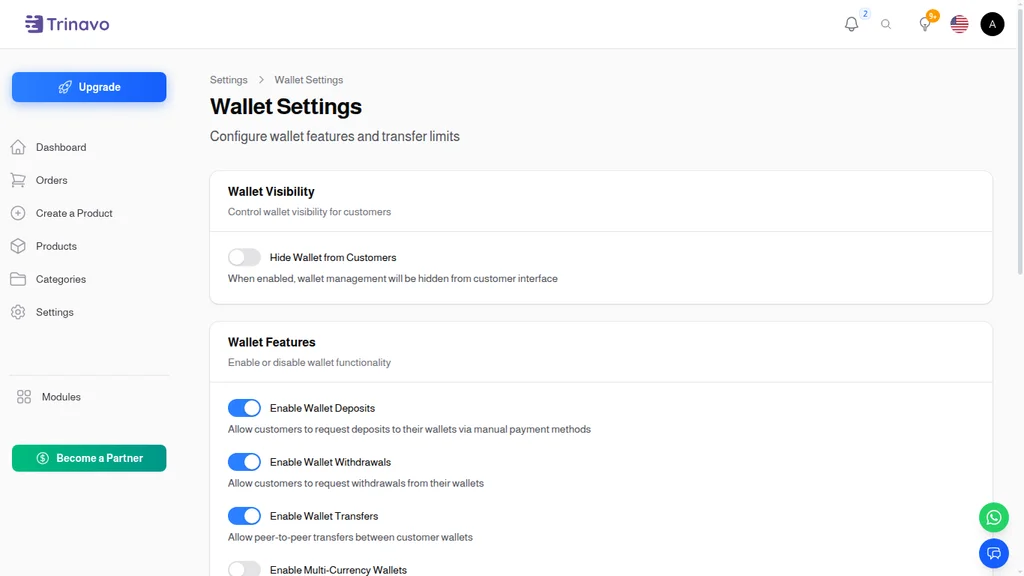
The Wallet Settings page (Settings → Wallet) groups the controls into three sections:
Wallet Visibility
- Hide Wallet from Customers — a master switch that keeps wallets running in the background but hides them from the customer-facing UI. Use this when you're using wallets purely for internal operations (refunds, commission payouts) and don't want customers managing balances directly.
Wallet Features
Four independent toggles determine what customers can actually do with their wallets:
- Enable Wallet Deposits — customers can submit deposit requests via manual payment methods (bank transfer, cash, etc.) to top up their balance
- Enable Wallet Withdrawals — customers can request cash-out from their wallet balance back to their bank account
- Enable Wallet Transfers — peer-to-peer transfers between customer wallets (community-style payments)
- Enable Multi-Currency Wallets — customers maintain separate balances for each currency they transact in; when disabled, everything runs in the base currency
The beauty of these being independent toggles is that you can enable just what makes sense. A small retail store might only enable deposits (refund credits come in, customers use them on their next order). A marketplace might enable all four. A B2B shop might turn off transfers but keep deposits and withdrawals for managing advance payments.
Request Limits
- Max Pending Deposit Requests — prevents a single user from submitting a hundred deposit requests and overwhelming your review queue
- Max Pending Withdrawal Requests — same protection for withdrawals
These limits are per-user, not global — they just keep individual accounts from creating a flood of pending work.
The User Wallets List
Every account in your store has a wallet. The User Wallets admin page is where you see them all at a glance.
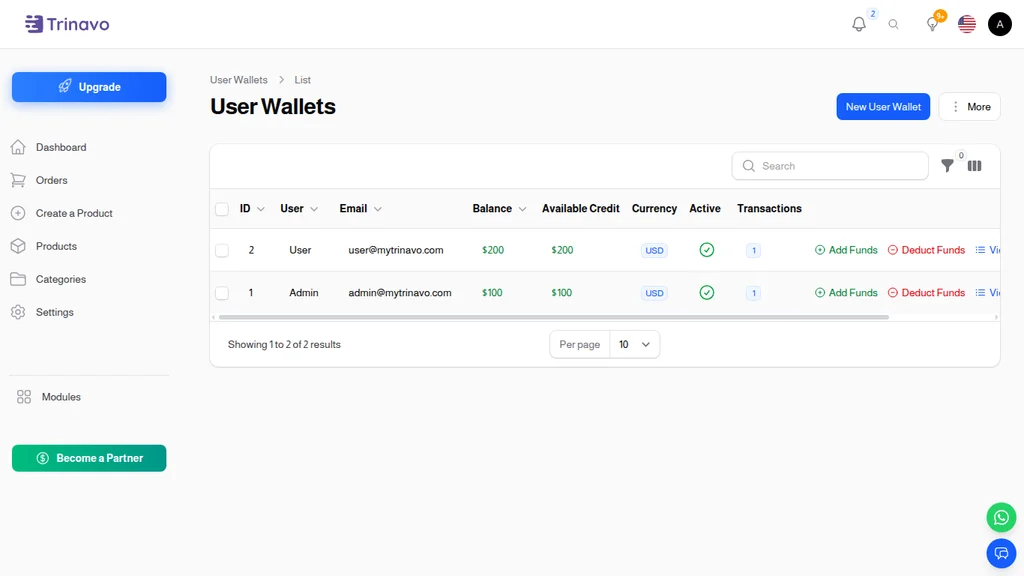
Each row shows:
- ID — the wallet's internal identifier
- User — the customer the wallet belongs to
- Email — their account email
- Balance — current wallet balance, in the wallet's currency
- Available Credit — balance that can actually be spent (excludes holds/pending withdrawals)
- Currency — the currency this wallet holds (TRY, USD, EUR, etc.)
- Active — whether the wallet is usable; deactivating a wallet stops all transactions on it without deleting history
- Transactions — how many transactions have been recorded on the wallet
Three inline actions appear on every row:
- Add Funds — admin-initiated credit to the wallet (useful for compensations, loyalty payouts, manual top-ups)
- Deduct Funds — admin-initiated debit (correction, claw-back, penalty)
- View — opens the full wallet detail with transaction history
These inline actions matter more than they sound. When a customer calls support saying "I was promised $50 credit, where is it?" — your agent can open the User Wallets page, find the account, click Add Funds, and be done in under a minute. That's how you keep customer satisfaction scores high on refund-related support.
Multi-currency in action
When Multi-Currency Wallets is enabled, a single customer can have multiple wallets — one per currency they've transacted in. The Currency column makes it obvious which is which, and balances don't auto-convert between them. A customer with $120 in their USD wallet and €45 in their EUR wallet sees both separately; they choose which to spend from at checkout based on the currency of their order.
Wallet Transactions — The Full Audit Trail
Every movement of money into or out of a wallet becomes a transaction row. There is no situation where a balance changes silently.
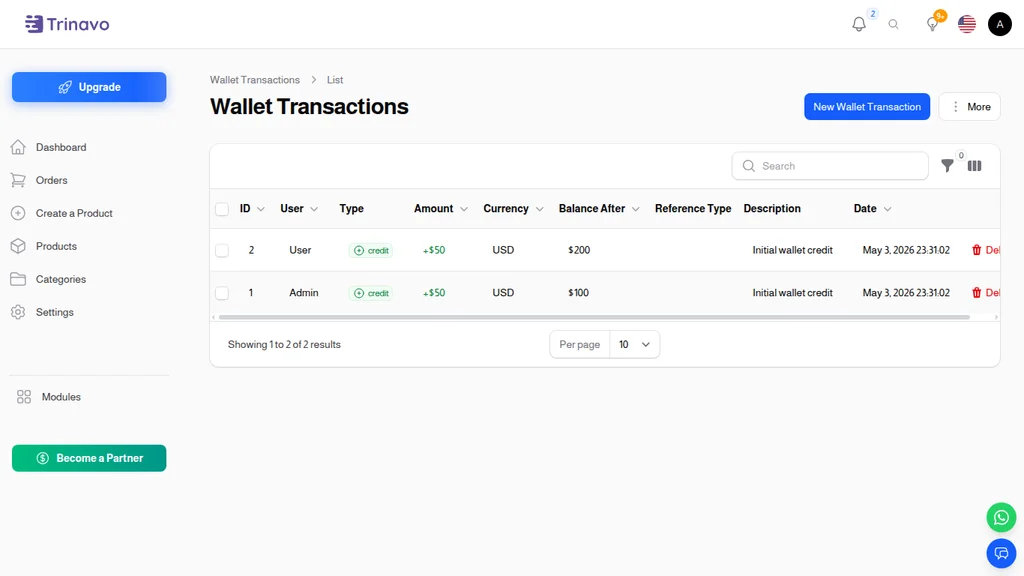
Each transaction row records:
- ID — the transaction identifier
- User — whose wallet moved
- Type — credit (green, funds added) or debit (red, funds deducted)
- Amount — the movement, with +/- and color indicating direction
- Currency — the wallet's currency
- Balance After — the resulting balance; great for tracing historical state
- Reference Type — what triggered the transaction (see below)
- Description — a human-readable note
- Date — timestamp
Common reference types
- order — a customer paid for an order using their wallet balance
- order_refund — an order was refunded and the money came back to the wallet
- admin_adjustment — a manual credit or debit applied by staff
- customer_referral_commission — a referral commission (if the referrals program is enabled)
- customer_referral_commission_reversal — a reversed referral commission from a refunded order
These reference types make the audit trail interpretable. When a customer asks "what was that +500 on March 15?" you can filter by user and date, find the transaction, and see instantly it was an admin_adjustment with description "Welcome back bonus" — no digging, no guessing.
Deposit Requests — Customer-Initiated Top-Ups
When Wallet Deposits are enabled, customers can add funds to their wallet via the manual payment methods you've configured (bank transfer, cash, etc.). Each request lands in a review queue.
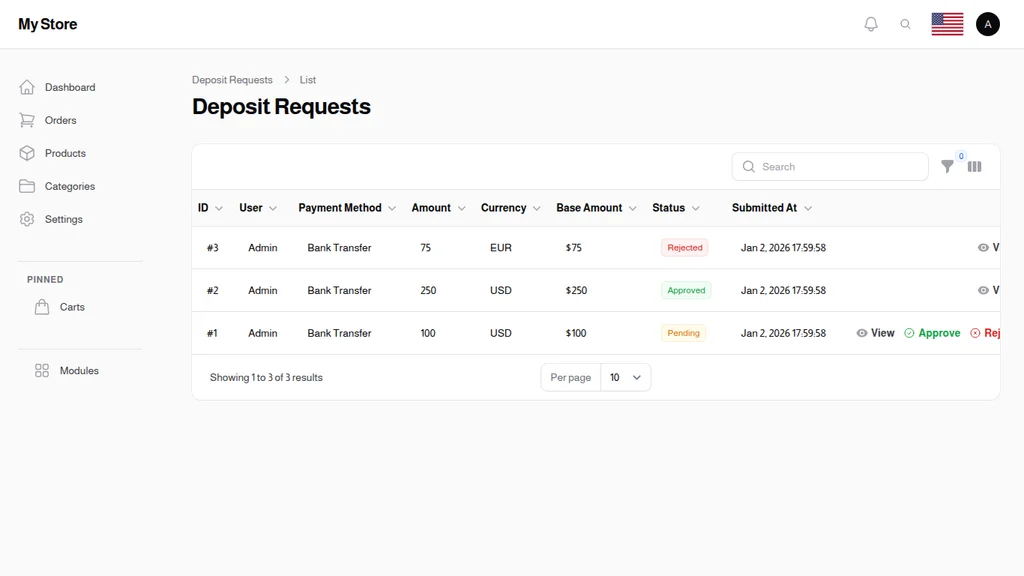
The Deposit Requests page shows every pending and completed deposit with:
- ID — request number
- User — who submitted it
- Payment Method — how they're paying
- Amount — requested deposit amount
- Currency — the currency they're depositing
- Base Amount — converted to your store's base currency for reporting
- Status — pending, approved, rejected
- Submitted At — timestamp
Your workflow as an admin is simple: a customer submits a deposit request with proof of payment (a bank transfer receipt, for example). You review the proof, click Approve, and the wallet is credited automatically. If something's off — wrong amount, unclear proof, unauthorized method — you Reject with a reason, and the customer sees the reason on their side.
Why this is powerful
Manual deposits let you accept payment methods that don't plug into traditional payment gateways: bank transfers in countries with limited card penetration, cash-in-store for local customers, crypto if that's your thing. The wallet absorbs the complexity, and your store-side UX becomes uniform: a wallet balance spends the same way regardless of how it got there.
Withdrawal Requests — Cash-Out
The mirror-image of deposits. When Wallet Withdrawals are enabled, customers can request to cash out their balance. They specify the amount and their payout details (bank account, PayPal, etc.), and the request lands in your admin queue.
Just like deposits, withdrawal processing is a two-click flow — review the request, approve or reject. On approval, the wallet is debited and you handle the actual payout via your chosen channel (bank wire, check, etc.). The transaction log records the whole flow so there's no ambiguity later.
Withdrawals matter most for marketplace models. If your store features independent sellers, a rider-commission setup, or a customer-referral program where people earn real money, withdrawals are the path for them to take that money out of your ecosystem. Without withdrawals, balances are store-credit only — fine for many merchants but limiting for marketplaces.
Peer-to-Peer Transfers
When Wallet Transfers is enabled, customers can send wallet balance to other customers. The sender specifies the recipient (by email or wallet ID) and amount; the system debits the sender's wallet and credits the recipient's in an atomic transaction. Both parties see the movement in their transaction history with a "transfer" reference type.
Use cases are narrow but powerful when they apply:
- Community marketplaces where members trade with each other
- Gift-card-like experiences ("send $20 to your friend's account")
- Team/family accounts sharing store credit
- Referral bonuses paid between customers
For most retail stores, transfers stay off. For marketplace-style stores, they're the difference between a transactional relationship and a community.
Multi-Currency in Practice
With Multi-Currency Wallets enabled, every currency your store supports can have its own wallet per customer. Three principles to understand:
-
Balances don't auto-convert. $100 in a USD wallet doesn't become €90 in a EUR wallet unless you explicitly make it happen. This prevents confusion from constantly-shifting exchange rates.
-
Checkout spends from the matching wallet. If a customer buys in USD, the USD wallet is offered. If they buy in EUR, the EUR wallet. If they don't have a balance in the order currency, they pay normally via their payment method.
-
Admin tools show everything. User Wallets, Wallet Transactions, and the per-customer wallet detail pages all respect the currency dimension. You can filter, export, and reconcile currency by currency.
For international stores, this is essential. It lets a customer in Germany hold a EUR balance naturally while a customer in Turkey holds TRY and a customer in the US holds USD — all in the same store, all in the same wallet system, without awkward conversions at every turn.
Everyday Admin Workflows
Wallets show up in support scenarios more than anywhere else. A few patterns that come up weekly:
Issuing refunds fast. A customer returns an item. The quick refund path is: find their User Wallet, click Add Funds, enter the refund amount with a description like "Refund for order #1234." They have the credit in seconds and can immediately reorder. No payment gateway delay.
Promotional credits. You want to reward customers who complete a survey, or win a contest, or recover from a bad experience. Admin-adjustment credits are how you issue the reward, with a clear description that shows up in their wallet history.
Commission payouts. Loyalty points, referral commissions, affiliate earnings — all of these ultimately land in the customer's wallet as a credit transaction. The customer decides when and how to spend the balance, and the full history is searchable.
Dispute resolution. A customer claims they made a deposit that wasn't credited. Filter Wallet Transactions by their user, by date range, and you'll see either the credit (case closed, their info was outdated) or the gap (now investigate the original deposit request).
Account closure. When a customer deletes their account, the wallet balance becomes a question of policy. Usually you refund the remaining balance via an admin-initiated withdrawal, record the transaction with a note, and close the wallet. The transaction history stays in the audit log forever even after the user record is soft-deleted.
The Bottom Line
Wallets are infrastructure. Once they're running, they quietly enable a dozen capabilities that together make your store feel professional and frictionless: instant refunds, store credit, loyalty payouts, referral commissions, manual payment acceptance, cash-out for marketplace sellers, peer-to-peer transfers, and multi-currency balances.
Trinavo's Multi-Currency Wallets give you all of this in a single, toggle-configured module. You decide which features to turn on, you get a full audit trail for free, and you never have to think about the plumbing again.
The best time to enable wallets is before you need them. The second best time is the day a customer first asks for something only a wallet can deliver.