
From Product to Printed Label in Two Clicks
Every retail and inventory operation eventually needs the same thing: a barcode on the shelf, on the box, on the price tag. Without one, the cashier types in product names. With one, scanning is instant. The difference shows up everywhere — at checkout, in stock counts, in returns, in receiving.
Most stores hit a wall here. They either buy a separate barcode label app (extra subscription, extra integration), pay a print shop, or build something hacky in a spreadsheet. Trinavo's Barcode Labels feature eliminates all of that. It is built into your store admin, it auto-generates valid barcodes for products that don't have one, and it prints to whatever you already own — a regular office printer with A4 sticker sheets, or a thermal label printer with a 50×30 mm roll.
You don't need a barcode background. You don't need to know the difference between EAN-13 and Code 128. The system picks a sensible default, lets you change it if you care, and produces a clean PDF you can send to any printer.
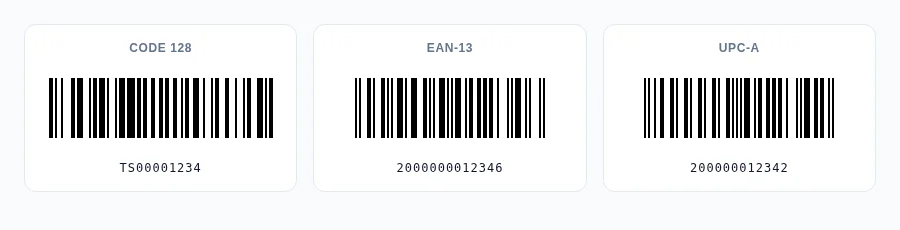
Four Formats, One Field
Different products need different barcodes. Trinavo supports the four that cover virtually every real-world use case:
- Code 128 — the default. Variable length, accepts letters and digits, no GS1 registration needed. Perfect for internal codes, in-store identifiers, warehouse labels.
- EAN-13 — the 13-digit retail standard used worldwide. Auto-generated codes use the GS1-reserved internal prefix (
200…), so they're guaranteed not to collide with real retail SKUs. - UPC-A — the 12-digit North American retail standard. Auto-generated with the in-store prefix (
2…). - QR Code — modern, scannable from phones, encodes anything from a SKU to a full URL. Great for product info pages or links to digital content.
The product edit form has two side-by-side fields: Barcode (the value) and Barcode Format (the type). Click the sparkle icon next to Barcode and the system generates a valid value for the chosen format — checksums included. Want to paste an existing supplier's EAN-13? Just paste it; the system validates it and tells you immediately if a digit is wrong.
Auto-Generation That Just Works
If you've ever tried to "make up" a barcode, you've discovered that real retail barcodes are picky. EAN-13 demands exactly 13 digits with a specific checksum. UPC-A wants 12 digits with a different checksum algorithm. Get the math wrong by one digit and scanners refuse to read the code.
Trinavo handles all of this for you. When you click the generate button — or when you go to print and a product is missing a barcode — the system:
- Picks the format you've configured for that product (or Code 128 by default)
- Generates a unique value using your store's prefix and a sequential number
- Computes the correct checksum if the format requires one (EAN-13, UPC-A)
- Validates the result and saves it
Auto-generated codes use GS1-reserved internal prefixes for retail formats — 200 for EAN-13, 2 for UPC-A — so a code generated for your store will never accidentally collide with a real product on the global retail database.
Print to Anything You Already Own
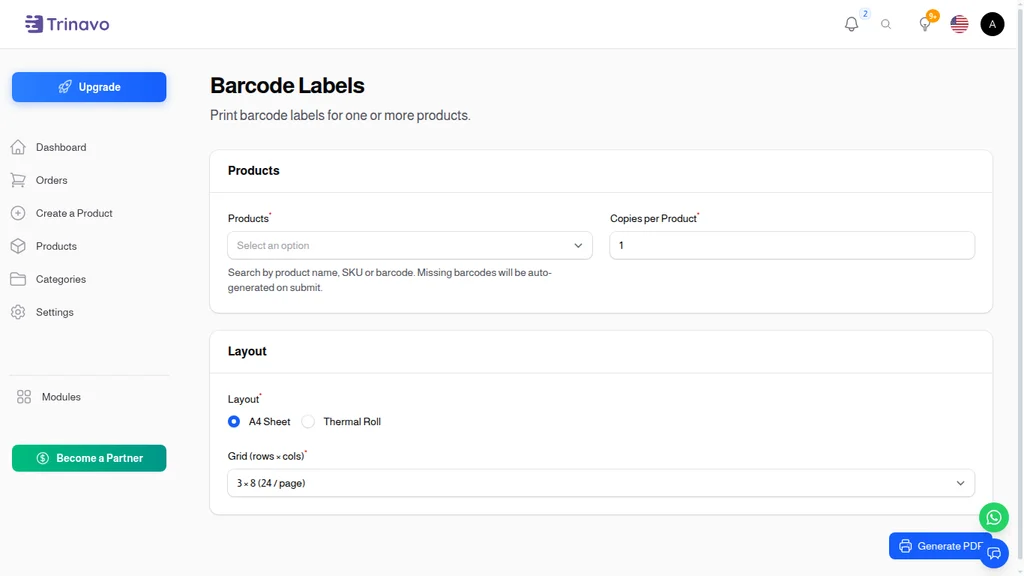
The Barcode Labels admin page is where the printing happens. It is deliberately simple:
- Pick the products you want labels for (search by name, SKU, or barcode)
- Set how many copies of each
- Choose a layout — A4 sheet for office printers, thermal roll for label printers
- Pick a size or grid preset
- Click Generate PDF
The page does the rest: it auto-generates barcodes for any selected product that's missing one, builds the PDF, and downloads it. No external service, no extra account, no per-print fee.
A4 Sheets and Thermal Rolls — Both Built In
Trinavo supports both common print paths, side by side:
- A4 sheet for any office printer — pick from grid presets (3 × 8, 4 × 10, 2 × 7, 5 × 13, 2 × 4) to match the Avery-style sticker sheet you already buy at the office store.
- Thermal roll for any thermal label printer (Zebra, Brother, Dymo, generic 58/80 mm) — pick a size (50 × 30, 40 × 20, 30 × 20, or 100 × 50 mm) and the PDF comes out one label per page, sized to your roll.
The output is always a regular PDF. Print it on any printer; no per-print fees, no driver gymnastics, no third-party service. Mix formats freely — some products tagged with EAN-13 for retail scanning, others with QR for richer customer interactions, all printed on the same sheet.
Built into the Scanner You Already Have
Trinavo's admin already includes a camera-based barcode scanner for finding products fast. Now that you're printing barcodes, that scanner becomes the natural way to look them up: scan the label on a returned product, the scanner matches it against your barcode field, and the right product opens up.
The scanner indexes both the Barcode field and the SKU field, so legacy SKU-based scanning continues to work while you transition to true barcodes. Print a label, scan it back, find the product — closed loop.
Why This Matters for Your Operation
A few minutes of setting up barcodes saves hours every week:
- Faster checkout — scan instead of typing
- Accurate stock counts — scan a shelf, the system knows what's on it
- Faster returns — scan the label, the original order pops up
- Cleaner receiving — scan incoming items into stock without lookup
- Fewer mistakes — barcode + price match on the receipt; no transposed prices
It also makes your store feel professional. A handwritten price tag says garage sale. A printed barcode label says retail business.
Built-In, Not Bolted-On
This isn't a third-party plugin. Barcode labels are part of the same admin you already use. Same login, same permissions, same multi-tenant isolation, same multi-language support. The Arabic interface generates the same barcodes, the same labels, the same PDFs — the format is locale-agnostic, but the UI around it speaks your team's language.
When you're ready to ship, this is one less subscription you need.