
The Difference Between Clicks and Customers
Every marketer knows the frustration: your dashboard shows thousands of clicks, hundreds of sessions, impressive reach — and your bank account shows almost nothing. The traffic is real. The engagement is real. The purchases aren't. Somewhere between "visited the site" and "bought something," the funnel is losing people, and without the right tracking you have no idea where.
Qualified Lead Tracking is about closing that gap. Instead of measuring clicks, you measure real commitment: the customer who added a product to their cart, registered an account, customized their profile, or completed a purchase. These are the signals that separate tire-kickers from genuine customers, and tracking them back to the original ad campaign is what lets you cut the channels that don't work and double down on the ones that do.
Trinavo gives you a full attribution stack out of the box. Built-in analytics show you exactly what's happening in your store. Plugin-based integrations route those events to external platforms — Google Analytics 4, Meta Pixel (Facebook), and more — so the ad platforms can optimize your campaigns around the behaviors that actually matter to your bottom line.
The Built-In Analytics Dashboard
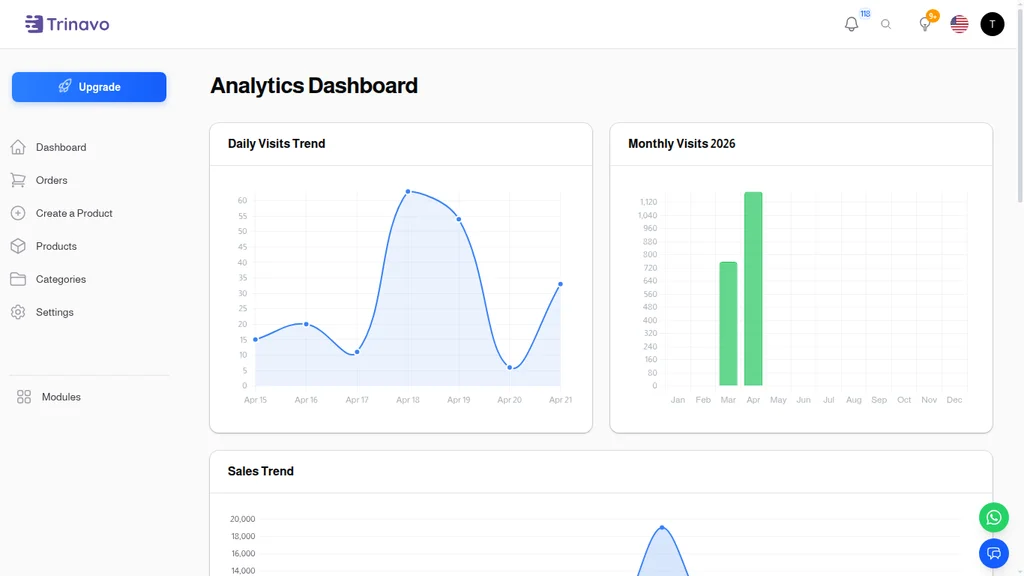
Before you plug in any external tracker, Trinavo already tells you what's happening. The Analytics Dashboard in your admin panel shows:
- Daily Visits Trend — a smoothed line chart of unique visitors over the last 7 days, with hover tooltips for exact counts per day
- Monthly Visits — a bar chart breaking down visits by month, so you can see seasonality at a glance
- Sales Trend — revenue over time, laid next to traffic so you can spot correlations (and divergences)
Just those three charts are enough for most small stores to make intelligent decisions. Traffic up but sales flat? Something in the funnel is broken. Revenue up but traffic flat? You're converting better — find out why and repeat it. A sudden spike in either? Trace it to the day, check what went out that day (an email, an ad, a promo), and learn.
What counts as a "visit"
Trinavo's built-in analytics respects privacy and avoids bot inflation. A visit is counted when:
- A real browser loads a page (bots filtered by user-agent and behavior patterns)
- The IP + user-agent combination hasn't visited within a session window (typically 30 min)
- The session is not from a previously-tagged admin, staff member, or internal tool
The result is a traffic number you can trust — often 30-50% lower than the raw hit count that some tools report, but far more honest.
Beyond visits
The analytics module goes deeper than the dashboard. Drill-downs cover:
- Product performance — which items get viewed most, which get added to cart most, and which convert best
- Category analytics — traffic and revenue by category, for understanding customer interests
- Geographic analytics — country-level breakdowns (useful for shipping decisions and localization)
- Session analytics — device type, referrer source, time-on-site
These reports are where "qualified lead tracking" starts becoming actionable. The Google Ads campaign driving 1,000 sessions per month that all bounce after 10 seconds? Cut it. The Instagram influencer link driving only 50 sessions but 12 of them adding to cart? Scale it.
External Tracking — Plugin Integrations
Built-in analytics is the honest view of what's happening in your store. External trackers are what let Google, Meta, and other ad platforms optimize for the customers you actually want.
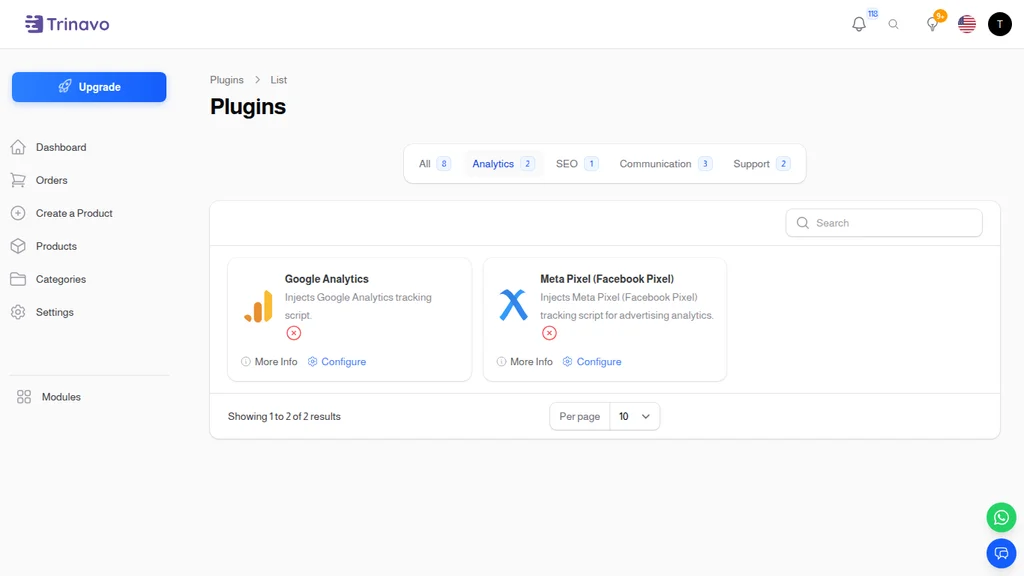
Under Plugins → Analytics, Trinavo ships with two tracking integrations out of the box, each a one-click install + field-based configuration:
Google Analytics (GA4)
Google's next-generation analytics platform. The plugin injects the tracking script with the Measurement ID you paste in — typically a G-XXXXXXXX format ID from your Google Analytics account. Once configured:
- Every page view gets reported to GA4 with full URL, referrer, user agent, and session ID
- E-commerce events — add_to_cart, begin_checkout, purchase — fire automatically when customers take those actions, so GA4 builds a real funnel picture
- User demographics (where Google has consented data) overlay on top of the funnel, showing you which age groups, genders, and interests actually buy
GA4 is the default because it's free, powerful, and integrates with Google Ads for campaign optimization. If you're running any Google Ads at all, GA4 is non-negotiable.
Meta Pixel (Facebook Pixel)
The tracking pixel for Facebook and Instagram ads. Once your Pixel ID is pasted in, the plugin injects the tracking code that fires events Meta's ad platform uses to optimize campaigns:
- PageView — someone visited your site (the baseline)
- ViewContent — someone looked at a specific product
- AddToCart — someone added a product to their cart
- InitiateCheckout — someone started the checkout flow
- Purchase — someone completed a purchase, with the cart value attached
These events are what turn "run a Facebook ad" into "run a Facebook ad that Meta's algorithm optimizes toward finding more buyers like your actual buyers." Without the Pixel, you're telling Meta to send you clicks. With it, you're telling Meta to send you buyers — a dramatically different (and more profitable) objective.
Combining both
Most stores run both GA4 and Meta Pixel in parallel. GA4 is your source of truth for analysis; Meta Pixel is how Meta's ad platform learns. They don't conflict, and having both gives you attribution on every major ad platform customers might come from.
The Full Ecosystem
The Plugins page groups integrations by purpose. Beyond Analytics, related categories shape the attribution picture:
- SEO — Google Search Console for organic search tracking
- Communication — WhatsApp Floating Button, Telegram Notifier, OneMessengerHub for off-site engagement tracking
- Support — Tidio and Zaetoon for chat-driven conversion assists
Each plugin is a one-click install with a simple configuration form. No custom code, no developer needed, no scripts to paste into templates. The plugin system handles injection into the right pages, respects your privacy settings, and stays updated as external platforms change their APIs.
Why This Matters — Qualified vs. Unqualified
"Qualified lead" has specific meaning in marketing. An unqualified lead is someone who showed up. A qualified lead is someone who showed commitment:
- Created an account (past the registration friction)
- Added products to their cart (past the "is this interesting?" filter)
- Started checkout (past the "am I really going to buy?" threshold)
- Completed a purchase (the definitive qualification)
The higher up that ladder someone goes, the more valuable they are — and the more valuable the source that sent them is. A traffic source driving 10,000 clicks with zero purchases is a bad source, no matter how cheap the clicks. A traffic source driving 100 clicks with 20 purchases is a goldmine, no matter how expensive.
Qualified Lead Tracking is what lets you see the difference. Without it, you rely on "click-through rate" and "CPC" — metrics that optimize for the wrong thing. With it, you optimize for "cost per qualified lead" or "cost per purchase," which is the only metric that correlates with profitability.
Setting Up a Real Attribution Stack
The recipe most growing stores converge on:
Step 1 — GA4 base layer
Install the Google Analytics plugin with your Measurement ID. This gives you:
- Honest site-wide traffic and conversion data
- A historical record (don't wait — you can't retroactively get this)
- The Google Ads integration that makes smart bidding actually smart
Step 2 — Meta Pixel
Install the Meta Pixel plugin with your Pixel ID. This gives you:
- Facebook and Instagram ad optimization
- Audience building (lookalikes of your actual buyers, not just visitors)
- Cross-device tracking on Meta's graph, which is one of the most accurate available
Step 3 — UTMs on every link
Every ad, email link, and social post should include UTM parameters (utm_source, utm_medium, utm_campaign). GA4 reads these and attributes traffic correctly to the source. Without UTMs, most paid social traffic shows up as "(direct)" or "(referral) / l.instagram.com" — useless for attribution.
Step 4 — Check the conversion settings
Both GA4 and Meta Pixel need to know what events count as "conversions." In GA4, mark Purchase as a conversion. In Meta Events Manager, the Pixel events fire automatically once the plugin is installed; verify in Events Manager that Purchase events are showing up cleanly.
Step 5 — Run for 30 days, then compare to built-in
After a month of data, compare the built-in Analytics Dashboard numbers to what GA4 and Meta show. They won't match exactly — GA4 might show 80% of built-in, Meta might show 60% — due to iOS privacy changes and ad-blockers. That's normal. The trend lines matter more than absolute numbers.
Privacy Considerations
Tracking is powerful. It's also increasingly regulated. A few principles that keep Trinavo stores compliant:
Built-in analytics is cookie-light. Trinavo's own analytics uses minimal tracking (session-based, not cookie-based by default) and doesn't send data to third parties. It works even with aggressive ad-blockers and is GDPR-safe without user consent.
External plugins require disclosure. Google Analytics and Meta Pixel both send data to third parties (Google and Meta respectively). Stores in jurisdictions with GDPR, CCPA, or similar regulations need to disclose this in a privacy policy and typically need a cookie consent banner. Trinavo doesn't include a consent banner plugin out of the box, but any generic consent tool will work.
Data respect by default. None of the plugins share customer PII (email, address, etc.) unless you specifically configure Enhanced Conversions in GA4 or Advanced Matching in Meta Pixel. By default, only anonymous behavioral data flows out.
Everyday Workflows
How the system integrates into day-to-day operations:
Weekly attribution review. Open the built-in Analytics Dashboard, then GA4's Acquisition report, then Meta Ads Manager's attribution view. Compare. Identify channels that are over- or under-performing versus cost. Adjust spend accordingly.
Launch tracking. When launching a new product or campaign, watch the real-time views in GA4 (or the built-in dashboard) for the first few hours. A campaign that starts drawing traffic instantly but zero add-to-cart action is a signal something's wrong with the landing page, not the ad.
Audience building. In Meta Ads Manager, use the Pixel data to build a Custom Audience of "people who added to cart but didn't purchase" and run a remarketing campaign at them. The Pixel data makes this trivial; without it, you couldn't target them at all.
Smart bidding. Once GA4 has 30+ conversions per month, Google Ads Smart Bidding (target-ROAS, target-CPA) starts working. Let Google's algorithm optimize bids based on GA4's actual conversion data and you'll typically see 10-30% cost savings versus manual bidding.
Attribution reset. Once a quarter, review all traffic sources in GA4. Some channels that looked great a quarter ago may have decayed. Some channels that looked weak may have improved. Adjust your media mix based on current data, not stale assumptions.
The Bottom Line
Marketing without tracking is guessing. Marketing with the wrong tracking is even worse — it's guessing while thinking you're measuring. Qualified Lead Tracking in Trinavo means measuring what matters: not traffic, but traffic that converts, not clicks, but clicks that become customers.
The built-in analytics dashboard answers the first layer of questions — is my store growing, where is traffic coming from, what's converting. The Google Analytics and Meta Pixel plugins route the same signals to the platforms that need them to optimize your ads. Together, they turn marketing from "pay for clicks" into "pay for qualified leads that turn into real customers."
Every dollar spent on ads should have a qualified-lead number attached to it. That's not a nice-to-have — it's the difference between a marketing budget that compounds and one that evaporates. Trinavo makes it the default.