Brands
Purpose
Brands help you organize products by their manufacturers or brand names, making it easy for customers to find products from their favorite brands. A well-managed brand catalog builds trust, helps customers filter products, and enables brand-specific promotions. Whether you sell electronics from Apple and Samsung, or clothing from Nike and Adidas, brands give structure to your product catalog.
Accessing Brands
Click Modules → Catalog Management → Brands
Brands List View
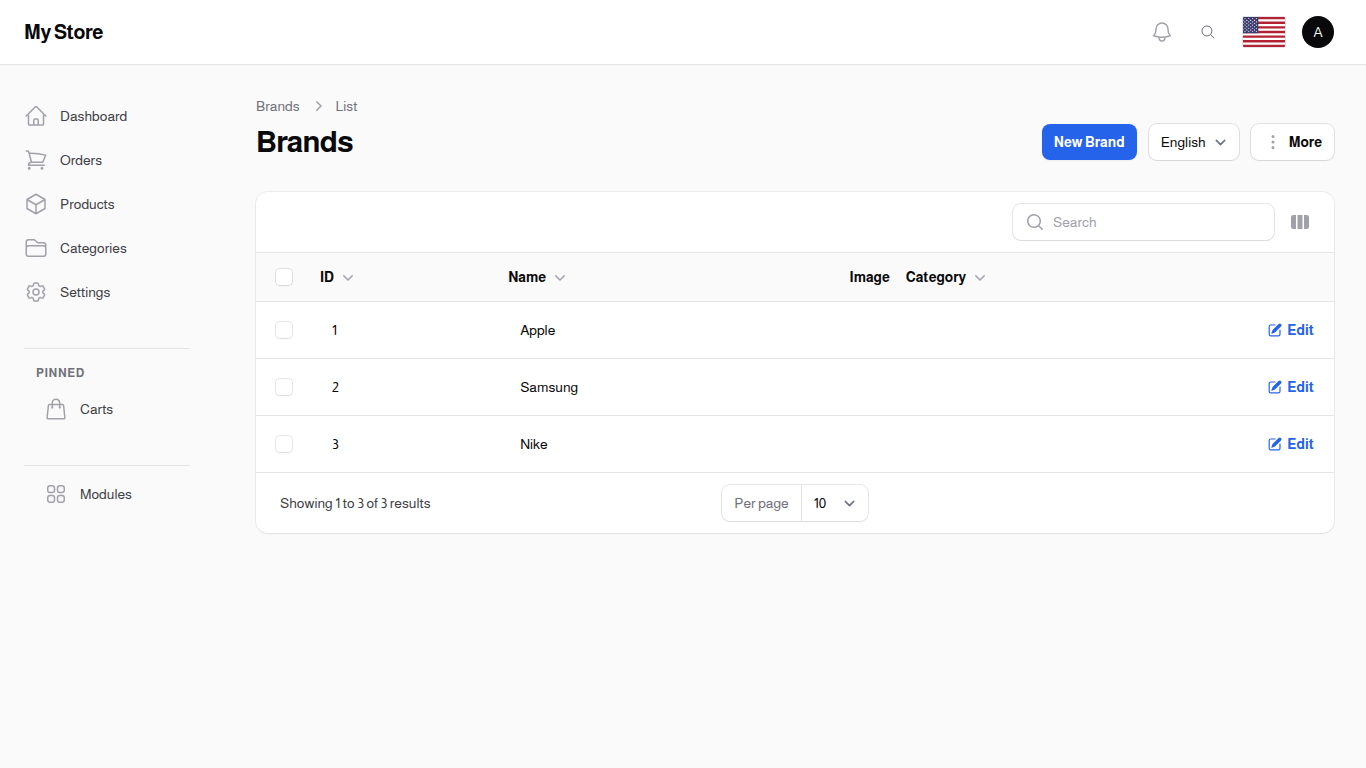
The Brands page showing all registered brands
Understanding the Brands List
The brand list displays all your brands in a table with the following columns:
Name - The brand name as displayed to customers - Click to sort alphabetically - Searchable for quick lookup - Supports multiple languages (Arabic/English)
Image - Brand logo or image - Thumbnail preview in the listing - Helps customers identify brands visually - Empty if no logo uploaded
Category - Optional category association - Links brand to a specific product category - Useful for brand-category relationships - Example: "Apple" linked to "Electronics"
Actions - Edit: Modify brand details - Standard actions for brand management
List Features
Locale Switcher - Switch between Arabic and English - Manage brand names in different languages - Each locale has separate name field
Search Bar - Search brands by name - Instant filtering - Helpful for large brand catalogs
Toggle Columns - Customize visible columns - Hide irrelevant information - Personalize your view
Bulk Selection - Checkbox to select individual brands - Select all checkbox for bulk operations - Perform actions on multiple brands at once
Bulk Actions Available: - Delete: Remove selected brands - Export: Export brand data to file
New Brand Button - Click to create a new brand - Opens the brand form in a dialog over the list
Exporting Brands
Export brand data to Excel or PDF for inventory management, supplier coordination, or reporting.
Export All: Click Export button to download all brands.
Export Selected: Select brands with checkboxes, then use Export from bulk actions.
Data Included: Brand name, associated category, image, creation date.
Creating a New Brand
Click the "New Brand" button at the top right. The form opens in a dialog over the list, so you keep the search and filters you were working with:
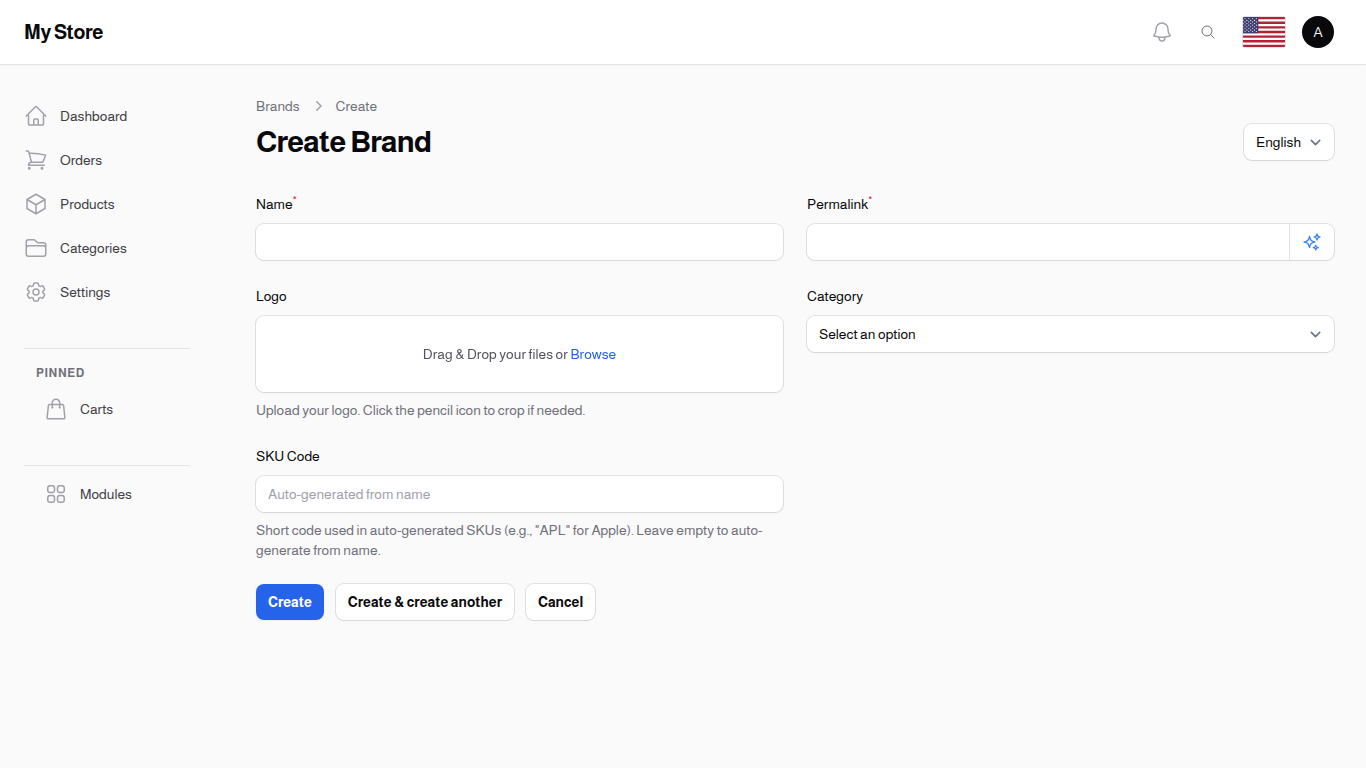
Brand creation form with name, image, and category fields
Name (Required)
- The brand name as shown to customers
- Must be filled before saving
- Should match official brand name
- Examples: "Apple", "Samsung", "Nike", "Adidas"
- Keep names consistent with official spelling
Naming Best Practices: - Use official brand capitalization (e.g., "iPhone" not "iphone") - Avoid adding extra information (e.g., "Samsung" not "Samsung Electronics Co.") - Be consistent across all languages
Web Address (Required)
- The short piece of text that identifies this brand in its web address
- It is written for you from the brand name as you type, so you normally do not need to touch it
- You can still change it by hand, or click the sparkle icon inside the field to build it again from the current name
- It cannot be left empty when you save
- Each language keeps its own web address, so check it again after switching the language selector
Logo
- Upload brand logo or image
- Click the pencil icon on the upload to crop it if needed
- Helps customers recognize brands
- Recommended format: PNG with transparent background
- Recommended size: 200×200px (square)
- Use official brand logos when possible
- Ensure you have rights to use the logo
Image Guidelines: - Use high-quality, clear logos - Square aspect ratio works best - White or transparent backgrounds preferred - Optimize file size for fast loading - Maintain brand identity guidelines
Category
- Optional: Link brand to a specific category
- Select from your existing categories
- Useful when brands are category-specific
- Leave empty for brands that span multiple categories
When to Link Categories: - Electronics brands: Link to Electronics category (Apple, Samsung) - Fashion brands: Link to Clothing category (Nike, Adidas) - Multi-category brands: Leave empty (they appear in multiple categories)
When to Leave Empty: - Brands that sell products across many categories - General marketplace brands - When brand-category relationship isn't important
SKU Code
- A short code, up to 10 characters, used when product codes are built for you automatically
- Example: "APL" for Apple, "SMS" for Samsung
- Optional: leave it empty and a code is created from the brand name instead
- Keep it short and distinct from your other brands
This only has an effect when automatic product codes are switched on and set to include the brand. See SKU Generator.
SEO Meta Tags
This section controls how the brand page looks in search results and when someone shares it. Every field here is optional.
- Meta Title: the headline search engines show. Aim for 50 to 60 characters. Leave it empty and the brand name is used
- Meta Description: the short summary under the headline. Aim for 150 to 160 characters. Leave it empty and the brand name is used
- Social Media Image: the picture that appears when the brand page is shared. Recommended size 1200x630 pixels. Leave it empty and the brand's own logo is used
- Meta Keywords: a few keywords separated by commas
The title, description and keywords are kept per language, so switch the language selector and fill them in for each one.
Saving Your Brand
After filling in the brand information:
- Create: Save the brand and return to the list
- Create & create another: Save and immediately start creating another brand
- Cancel: Discard changes and return to the list
Editing Existing Brands
To edit a brand: 1. Find the brand in the list 2. Click "Edit" or click directly on the brand name 3. Make your changes 4. Click "Save" to update the brand
Locale Management
Brands support multiple languages: 1. Use the Locale dropdown at the top of the form 2. Switch to Arabic to enter Arabic brand name 3. Switch to English to enter English brand name 4. Each locale has its own Name, Web Address, Meta Title, Meta Description and Meta Keywords 5. The logo, category, SKU code and social media image are shared across all languages
Translation Tips: - Some brands keep their name in English globally (Apple, Samsung) - Some brands translate their name (example: local brands) - Be consistent with how customers know the brand
Deleting Brands
Click Delete on the brand's own row, or tick several brands and use the bulk Delete.
Deleting is not silent. A window opens first, counting everything attached to the brand: its products and its part models. For each group you choose what should happen:
- Remove association (set to none) - the products stay, they simply no longer name a brand. This is the option already selected, and it is the right one almost every time
- Move to another record - hand the products to a different brand, which is what you want when two brands turn out to be the same company
- Delete them as well - use with care
Nothing is destroyed outright. A deleted brand is archived, and the row's three-dot menu lets you Restore it or delete it permanently once you are sure.
Tips for Brand Management
- Use Official Logos: Always use official brand logos when available
- Consistent Naming: Keep brand names consistent with official spelling
- Regular Updates: Update brand information if companies rebrand
- Category Links: Link brands to categories when it makes sense
- Quality Images: Use high-quality, clear logo images
- Multi-language: Provide brand names in both Arabic and English
- Verify Rights: Ensure you have permission to use brand logos
- Clean Data: Regularly review and remove unused brands
- Avoid Duplicates: Check before creating to avoid duplicate brands
- Brand Guidelines: Follow official brand guidelines when using logos
Brand Organization Strategies
By Product Category
Organize brands by linking them to specific categories: - Electronics: Apple, Samsung, Sony, LG - Clothing: Nike, Adidas, Puma, Under Armour - Kitchen: KitchenAid, Cuisinart, Breville
By Popularity
Feature popular brands prominently: - Use clear, recognizable logos - Ensure top brands are easy to find - Consider creating brand-specific landing pages
By Market Segment
Group brands by target market: - Premium brands: Apple, Rolex, Gucci - Mid-range brands: Samsung, Fossil, H&M - Budget brands: Xiaomi, Uniqlo
Common Brand Management Scenarios
Scenario 1: Adding a New Electronics Brand
- Click "New Brand"
- Enter brand name (e.g., "Sony")
- Upload Sony logo
- Select "Electronics" category
- Switch to Arabic locale and enter Arabic name
- Save the brand
Scenario 2: Managing Fashion Brands
- Create brand without category link (brands span multiple categories)
- Upload brand logo
- Products in different categories (Shirts, Shoes, Accessories) can all use the same brand
Scenario 3: Rebranding
When a company changes its name or logo: 1. Edit the existing brand 2. Update name if changed 3. Upload new logo 4. Update in both English and Arabic 5. Save changes (all products update automatically)
Brand Quality Checklist
Before publishing a brand:
- [ ] Brand name is spelled correctly
- [ ] Name provided in both Arabic and English
- [ ] Official logo uploaded
- [ ] Image is clear and high-quality
- [ ] Category linked (if applicable)
- [ ] No duplicate brands exist
- [ ] Brand name matches official branding
Relationship with Products
Brands connect to products in the following ways: - Products can be assigned to a brand in the product form - Customers can filter products by brand - Brand logos appear on product pages - Brand information helps with product organization
Product-Brand Best Practices: - Create brands before adding products - Assign correct brand to each product - Use brands for filtering and navigation - Highlight popular brands
Troubleshooting Common Issues
Issue: Brand logo not displaying - Solution: Ensure image is uploaded and saved, check file format (JPG, PNG, WebP)
Issue: Duplicate brands appearing - Solution: Search existing brands before creating new ones, merge duplicates
Issue: Products not showing brand filter - Solution: Ensure products have brands assigned in product settings
Issue: Brand name incorrect in one language - Solution: Switch locale and update the name field for that language
By maintaining a well-organized brand catalog, you help customers find their favorite products and build trust through recognizable brand names!
Related Sections
- Products - Products by brand
- Categories - Category organization
- Part Models - Organize products by manufacturer models