Loyalty Program Settings
Reward your customers with points: for what they buy, for writing a review and for signing up. Here you turn the program on and decide how many points each one is worth.
Where to find it
Click Settings in the sidebar, then the Loyalty Program card. It is also under Modules → Settings → Loyalty Program.
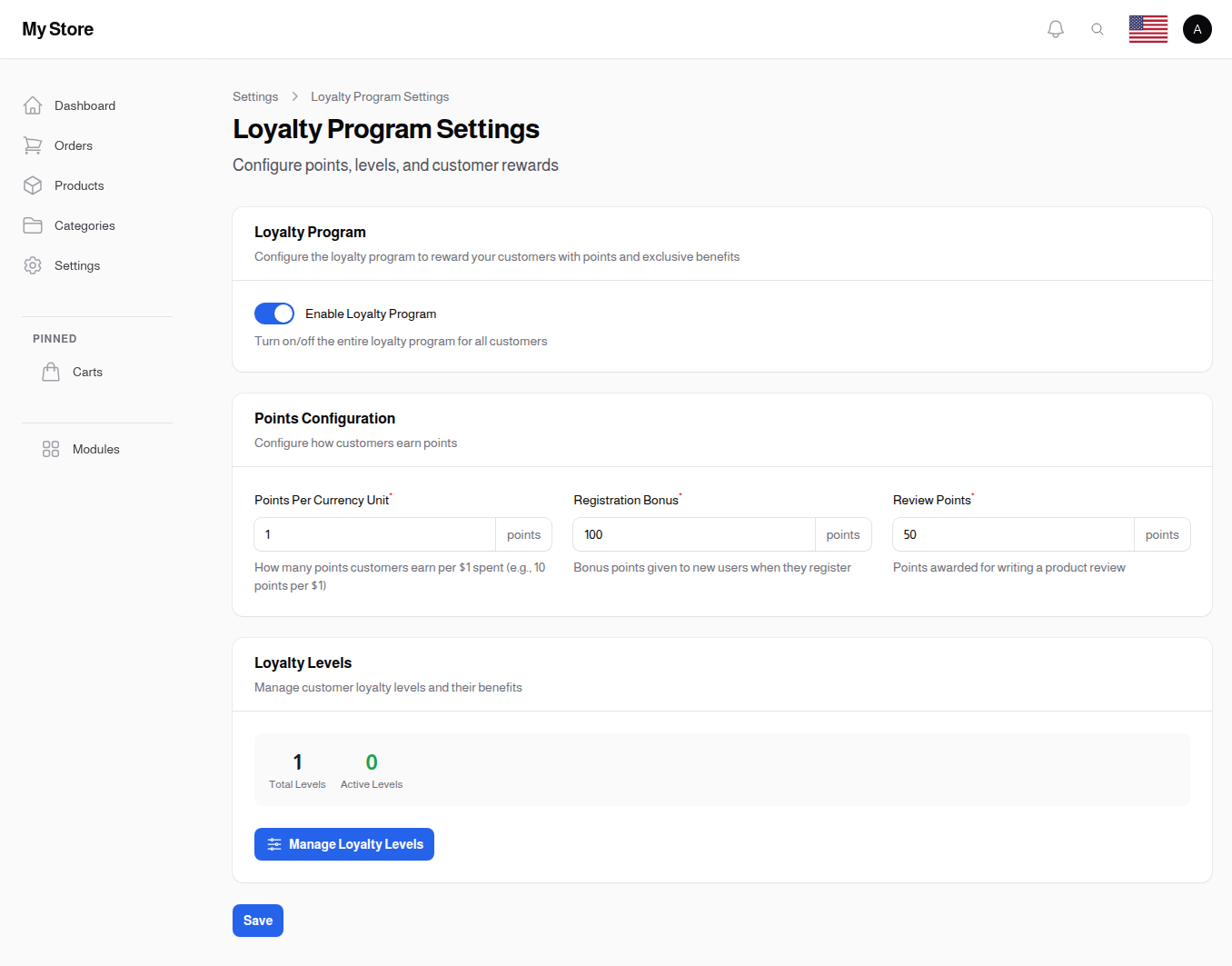
Turn on the loyalty program
- Turn on Enable Loyalty Program. It is available on paid plans.
- Set the points under Points Configuration, which appears once the program is on.
- Click Save.
While the program is off, no points are given for anything.
Choose how customers earn points
| Field | What it does |
|---|---|
| Points Per Currency Unit | Points for each unit of your main currency in an order's total, given once the order is paid. At 10, an order of 25 earns 250 points. |
| Registration Bonus | Points a new customer gets once, when they sign up. |
| Review Points | Points a customer gets for a product review, once you approve it. |
A customer's level can multiply the points they earn on orders and reviews; the registration bonus is never multiplied. Every point given shows in Loyalty Transactions.
Loyalty Levels
This section counts your levels (Total Levels, Active Levels) and names the Default Level. Manage Loyalty Levels opens User Levels in a new tab, where you set what each level needs and gives.