Booking Settings
Switch on appointments, so you can sell services that customers book for a day and time, and set the rules for the times they are offered.
Where to find it
Open Modules → Settings → Bookings.
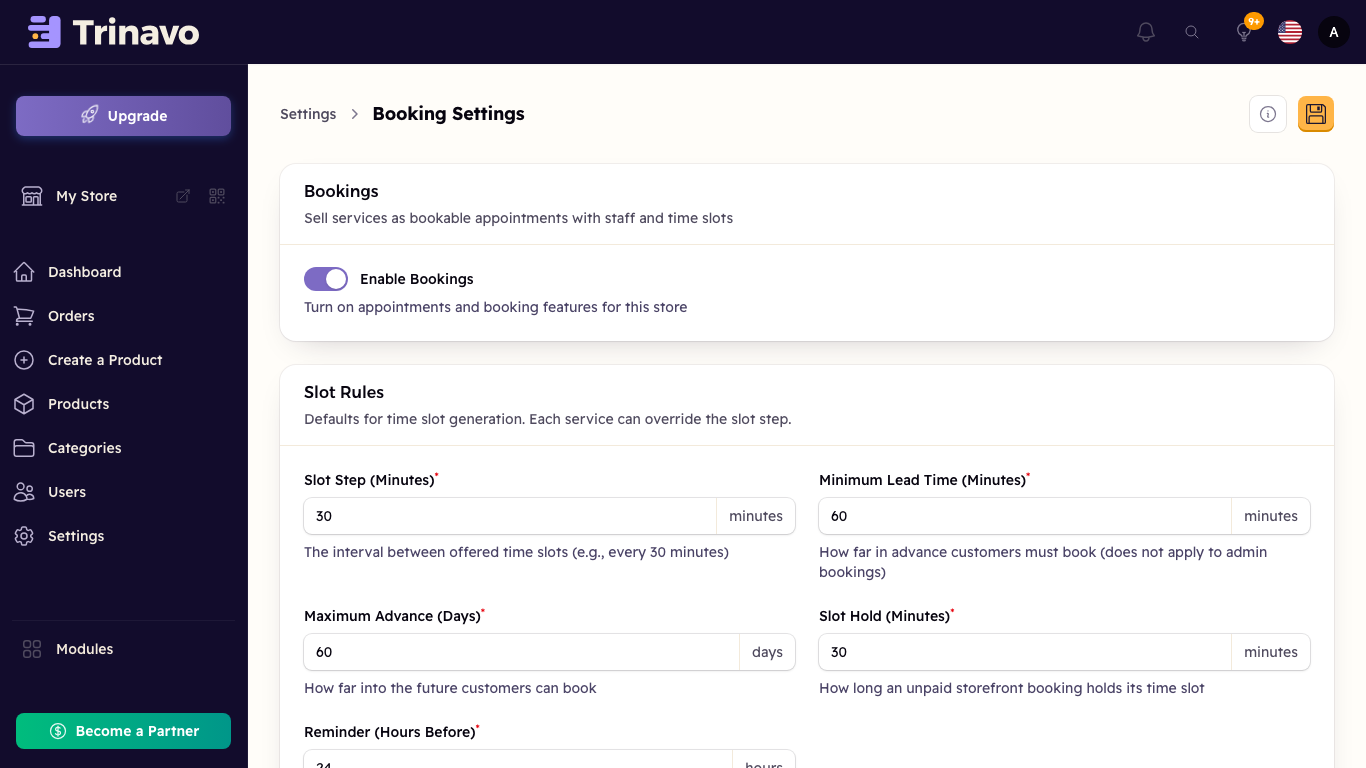
Turn on bookings
- Switch on Enable Bookings (every paid plan). The Slot Rules section appears.
- Set the slot rules below.
- Click Save.
Booking Calendar, Bookings and Staff then appear under Modules. Adding staff, making a product bookable and handling appointments are explained on Bookings.
Set the slot rules
| Field | What it does |
|---|---|
| Slot Step (Minutes) | The gap between the times offered: with 30, customers see 9:00, 9:30, 10:00. A service can have its own step. |
| Minimum Lead Time (Minutes) | How long before a time a customer must book it. Bookings you make yourself in the admin are not limited. |
| Maximum Advance (Days) | How far ahead customers can book. |
| Slot Hold (Minutes) | How long a booking made on the store keeps its time while it is not paid. After that the time is free again. |
| Reminder (Hours Before) | How many hours before the appointment the customer is reminded. |