States
Overview
The States section allows you to manage geographic subdivisions within countries - such as states, provinces, regions, territories, or governorates. This provides detailed location data for accurate address management, regional shipping configuration, and geographic targeting.
Purpose
- Detailed Address Management: Enable state/province selection in customer addresses
- Regional Shipping Zones: Configure state-specific delivery options and rates
- Geographic Targeting: Target marketing and promotions by state/region
- Address Validation: Validate customer addresses at the state level
- Tax Calculation: Apply state-specific tax rates (e.g., US sales tax)
- Location-Based Services: Provide state-level geographic accuracy
- Multi-Language Support: Translate state names for international customers
Accessing States
Click Modules → System Settings → States
List View
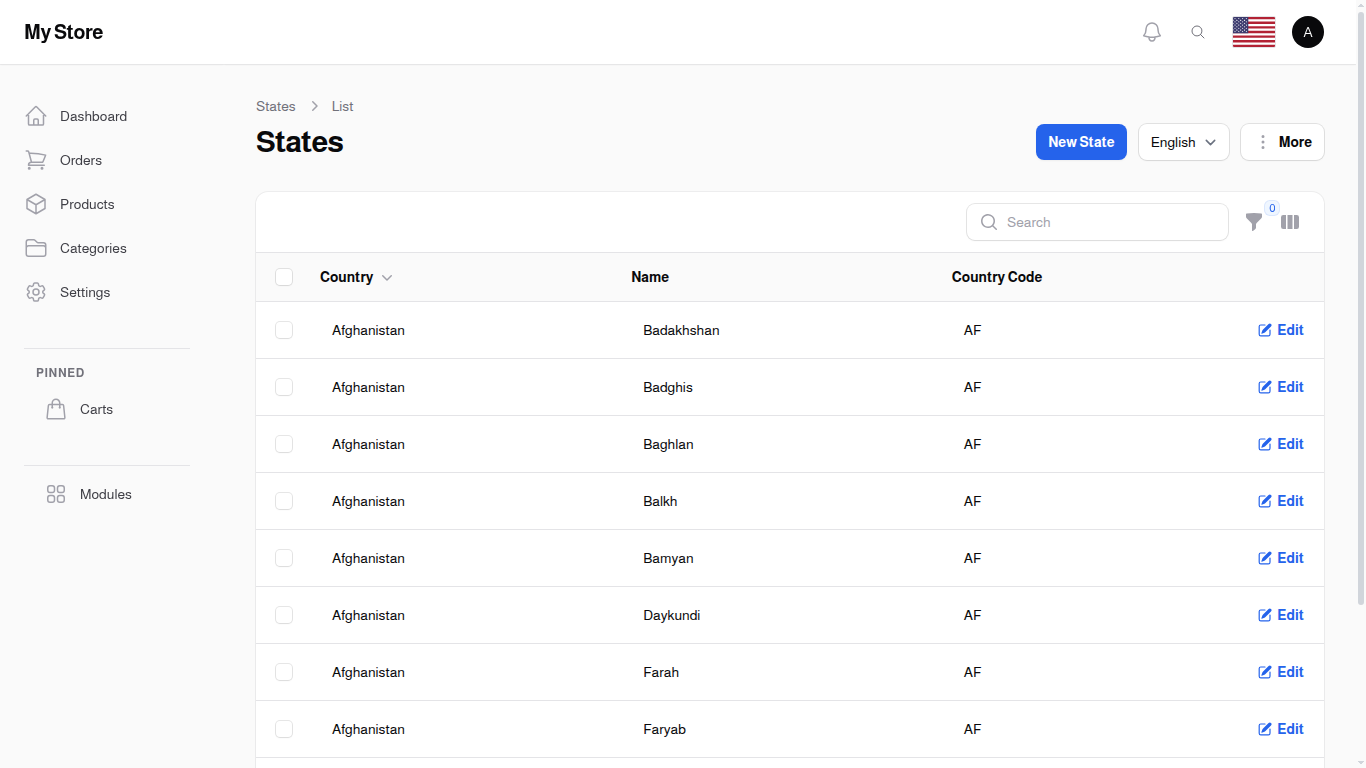
The States list displays geographic subdivisions within countries. The system comes pre-populated with 5,000 states covering major countries worldwide, including all US states, Canadian provinces, and regional divisions for most countries.
Table Columns
ID
- Shows: The reference number the system gives each state
- Format: Number
- Sortable: Yes
- Searchable: Yes - type a number in the search box to narrow the list, though it matches any number containing what you type (5 also brings up 15, 25 and 105)
- Visibility: Shown by default (toggle via column selector)
- Purpose: A stable way to refer to a state, handy when you compare an exported file with the list on screen
Country
- Shows: The country this state belongs to
- Format: Country name (linked to country record)
- Purpose: Identifies which country contains this state
- Sortable: Yes
- Button: Click column header to sort states by country
- Filter Available: Yes - use the Filter button to show states for specific countries only
Examples:
- Afghanistan (contains states: Badakhshan, Badghis, Baghlan, etc.)
- United States (contains states: California, New York, Texas, etc.)
- United Arab Emirates (contains emirates: Abu Dhabi, Dubai, Sharjah, etc.)
Usage:
- Group states by country for management
- Filter to work on specific country's states
- Understand geographic organization
Name
- Shows: State, province, or region name
- Format: Text (up to 255 characters)
- Translatable: Yes - can be different in each language
- Purpose: Display name shown to customers in address forms
- Searchable: Yes
- Visibility: Primary identifier in state selection dropdowns
Examples:
- "California", "New York", "Texas" (US states)
- "Ontario", "Quebec", "British Columbia" (Canadian provinces)
- "Abu Dhabi", "Dubai", "Sharjah" (UAE emirates)
- "England", "Scotland", "Wales" (UK countries)
- "Bavaria", "Berlin", "Hamburg" (German states)
Note: State names are translatable. For example, "California" in English could be "كاليفورنيا" in Arabic, though state names are typically less translated than country names.
Country Code
- Shows: Optional state/province code or abbreviation
- Format: Text (up to 3 characters)
- Purpose: Short code for the state, often used in addresses
- Searchable: Yes
- Examples:
- "CA" (California, USA)
- "NY" (New York, USA)
- "ON" (Ontario, Canada)
- "QC" (Quebec, Canada)
- "TX" (Texas, USA)
Usage:
- Abbreviate state names in addresses
- Used in postal systems (e.g., "Los Angeles, CA 90001")
- Quick identification of states
- Address formatting and validation
Note: Not all states have codes. This field may be empty for countries that don't use state abbreviations.
Created At
- Shows: When the state record was created
- Format: Date and time
- Sortable: Yes
- Visibility: Hidden by default (toggle via column selector)
Updated At
- Shows: Last modification date and time
- Format: Date and time
- Sortable: Yes
- Visibility: Hidden by default (toggle via column selector)
Search Functionality
Use the search box to find states by:
- State name (e.g., "California", "Ontario", "Dubai")
- Country code (e.g., "CA", "NY", "TX")
- Partial name matches (e.g., search "New" finds New York, New Jersey, New Mexico)
- Reference number (matches any number containing what you type, so 5 also finds 15, 25 and 105)
The search is case-insensitive and covers state names, country codes, and reference numbers.
Filters
Country Filter
Click the Filter button to filter states by country:
- Click the Filter button in the toolbar
- Select a country from the dropdown - you can type to search for it
- The list updates to show only that country's states
- Clear filter to show all states again
Note: You can filter by one country at a time. Choosing another country replaces the current one.
Use Cases:
- Work on states for a specific country (e.g., update all US state names)
- Review states for a region you're expanding to
- Verify state data for countries you serve
- Add missing states for a particular country
Example: Filter by "United States" to see only US states (California, New York, Texas, etc.)
Row Actions
Edit
- Function: Opens edit form to modify state details
- Available: For all states
- Can Modify:
- State name (in multiple languages)
- Country association
- Country code/abbreviation
- Impact: Changes affect address forms and all system features using state data
- Use Cases:
- Update state names in different languages
- Correct state codes
- Fix country associations
- Update regional names after political changes
Delete
- Function: Removes a single state
- Available: For all states
- Warning: Asks you to confirm first, and cannot be undone
- Impact: The state disappears from address forms, and any customer address or order that points at it loses its state
- Also removed: Any delivery cost you set for that state inside a delivery method is deleted along with it, and you are not warned about it separately
- Left behind: The cities that sat under the state stay in the Cities list, but they no longer belong to a real state
Best Practice: Before you remove a state, check that no customer address or order uses it, and check your delivery methods in case you priced that state.
Bulk Actions
Select multiple states using checkboxes to perform bulk operations:
Delete
- Function: Permanently removes selected states
- Warning: Requires confirmation
- Impact:
- States removed from address dropdowns
- May affect existing customer addresses and orders
- Delivery costs set for these states are deleted with them, and their cities are left without a state
- Cannot be undone
- Caution: Only delete states not referenced in customer data
Best Practice: Verify no customers, addresses, or orders use these states, and check your delivery method prices, before deleting.
Export
- Function: Export state data to Excel/CSV
- Exported Data: The state's reference number, the reference number of the country it belongs to, the state name, the country code, and the dates the record was created and last changed
- Use Cases:
- Backup state database
- Analyze geographic distribution of customers
- Create regional reports
- Share state data with logistics partners
- Audit state configurations
Note: The country appears as its reference number, not as its name. Export the country list too if you need to match the numbers to country names.
Note: You can also export without ticking anything. Open the More menu at the top of the list and choose Export to download the whole state list in one file.
Creating States
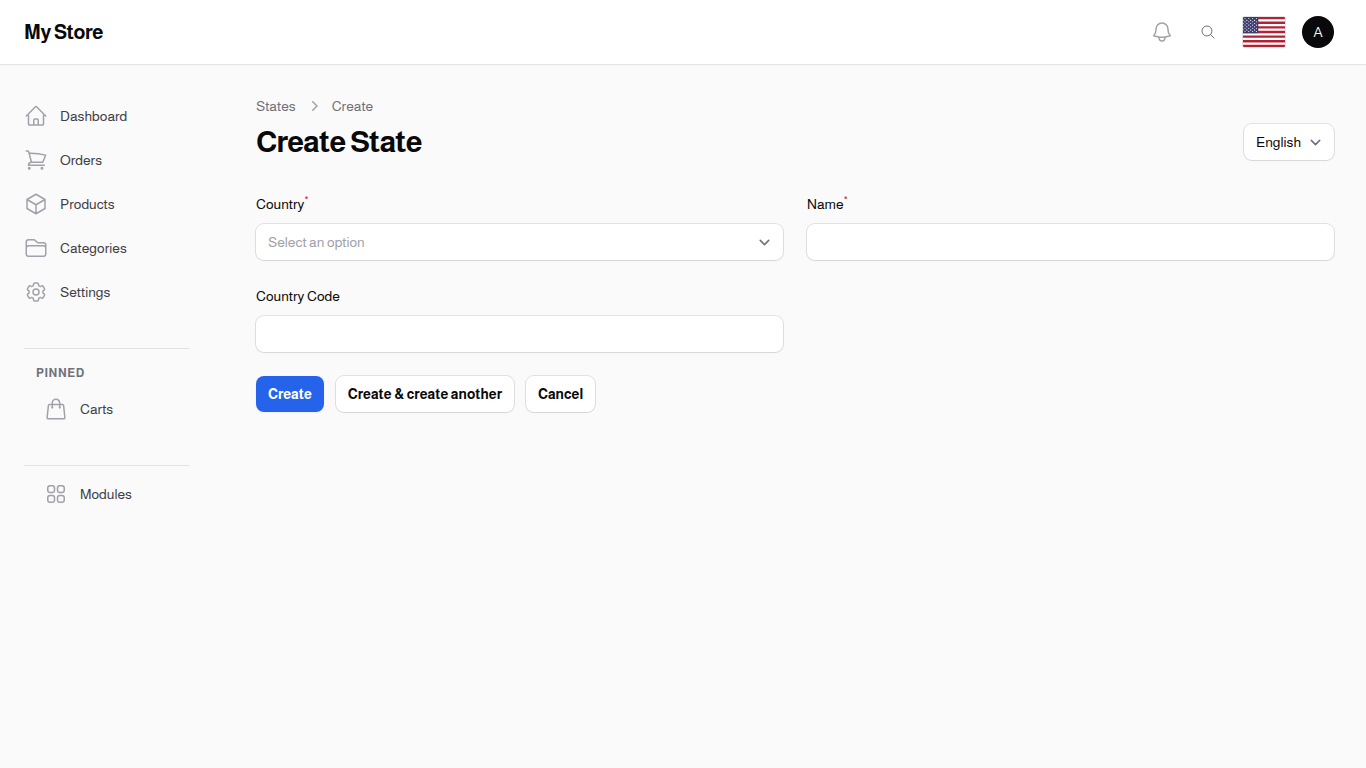
Click the "New State" button in the top-right corner to add a new state to the database. The form opens in a dialog over the list, so you keep the search and filters you were working with.
Note: The system comes pre-populated with 5,000 states covering most countries. You typically only need to create states if:
- Adding states for a country not in the database
- Your country has new administrative divisions
- You need custom regional groupings
- Setting up a test environment
Form Fields
Country Required
- Type: Searchable dropdown (Select)
- Purpose: Associate the state with its parent country
- Validation: Required
- Options: All countries from the Countries database
- Searchable: Yes - type to find countries
- Preloaded: Yes - all countries load immediately for quick selection
How to Use:
- Click the dropdown
- Type the country name (e.g., "United", "Canada", "Germany")
- Select the matching country from results
- The state will be associated with this country
Examples:
- Select "United States" for US states
- Select "Canada" for Canadian provinces
- Select "United Arab Emirates" for UAE emirates
- Select "Germany" for German states (Bundesländer)
Important: Choose the correct country. This determines where the state appears in address forms and which country's customers can select it.
Name Required
- Type: Text input
- Purpose: Official name of the state, province, or region
- Validation:
- Required
- Maximum 255 characters
- Translatable: Yes - use the Locale dropdown to add names in different languages
- Visibility: Appears in:
- State/province selection dropdowns in address forms
- Customer shipping addresses
- Order details
- Shipping zone configuration
- Reports and analytics
Best Practices:
- Use official state/province names
- Match naming conventions of existing states in the same country
- Use proper capitalization
- Provide translations if your store supports multiple languages
Examples:
- "California" (US state)
- "Ontario" (Canadian province)
- "England" (UK constituent country)
- "Abu Dhabi" (UAE emirate)
- "Bavaria" (German state)
For Multi-Language:
- English: "California"
- Arabic: "كاليفورنيا"
- Spanish: "California" (same spelling)
Country Code
- Type: Text input
- Purpose: Optional abbreviation or code for the state
- Validation:
- Optional
- Maximum 3 characters
- Format: Usually 2-3 uppercase letters
Examples:
- "CA" (California)
- "NY" (New York)
- "TX" (Texas)
- "ON" (Ontario)
- "QC" (Quebec)
- "NSW" (New South Wales, Australia)
When to Use:
- Country uses official state codes (like US, Canada, Australia)
- Postal system requires state codes
- You want abbreviated display in addresses
When to Leave Empty:
- Country doesn't have standard state codes
- Not applicable for the geographic subdivision
- Prefer full names in all contexts
Note: This is not a country code (like "US" or "CA"). It's a code specific to the state within its country.
Create Actions
Create
- Function: Saves the state and returns to list view
- Validation: Required fields must be filled (Country and Name)
- Impact: State becomes immediately available in state selection dropdowns
Create & Create Another
- Function: Saves the state and opens a blank form
- Use Case: When adding multiple states for a country in sequence
- Efficiency: Avoids returning to list view between creations
Cancel
- Function: Discards changes and returns to list view
- Warning: No confirmation - changes are lost immediately
How States Work
System Integration
States are used throughout the platform:
- Customer Addresses: State selection in billing and shipping addresses
- Address Validation: Ensure addresses include valid state information
- Shipping Configuration: State-specific delivery options and rates
- Tax Calculation: State-level tax rules (critical for US sales tax)
- Analytics: Geographic reports showing customer distribution by state
- Compliance: Regional regulatory requirements
- Marketing: State-based targeting for promotions
Pre-Populated Database
The system includes 5,000 states pre-configured:
- All US states and territories (50 states + DC + territories)
- Canadian provinces and territories (10 provinces + 3 territories)
- Major countries' administrative divisions
- Common regional subdivisions worldwide
Benefit: Most stores can use the database as-is without adding states manually.
Relationship with Countries
States must belong to a country:
- Each state is associated with exactly one country
- Customers select country first, then state
- State dropdown filters to show only states for selected country
- Can't create "orphan" states without a country
Example Flow:
- Customer selects "United States" as country
- State dropdown shows only US states (California, New York, Texas, etc.)
- Customer selects "California" as state
- Address is validated against US-California combination
Translatable State Names
State names support multi-language:
- Store different names for each locale
- Customers see state names in their language
- Admin can manage translations via locale dropdown
- Country association remains the same across languages
Example:
- English: "California"
- Arabic: "كاليفورنيا"
- Country: "United States" (same in all languages)
- Country Code: "CA" (same in all languages)
States vs. Cities
States are broader geographic divisions (provinces, regions):
- Selected after country
- Usually required in addresses
- Used for shipping zones and tax calculation
- Example: California, Ontario, Abu Dhabi
Cities are more specific locations within states:
- Selected after state
- Often optional in addresses
- Used for detailed location services
- Example: Los Angeles (in California), Toronto (in Ontario)
Hierarchy: Country → State → City
Related Sections
- Countries - Parent countries
- Cities - Cities within states
- Delivery Methods - Regional delivery options