Testimonials
Purpose
Testimonials allow you to showcase customer reviews and feedback on your store. Display authentic customer experiences to build trust and credibility with potential buyers. Testimonials can be shown in various places on your storefront, including a scrolling marquee component.
Accessing Testimonials
Click Modules → Marketing & Content → Testimonials
Testimonials List
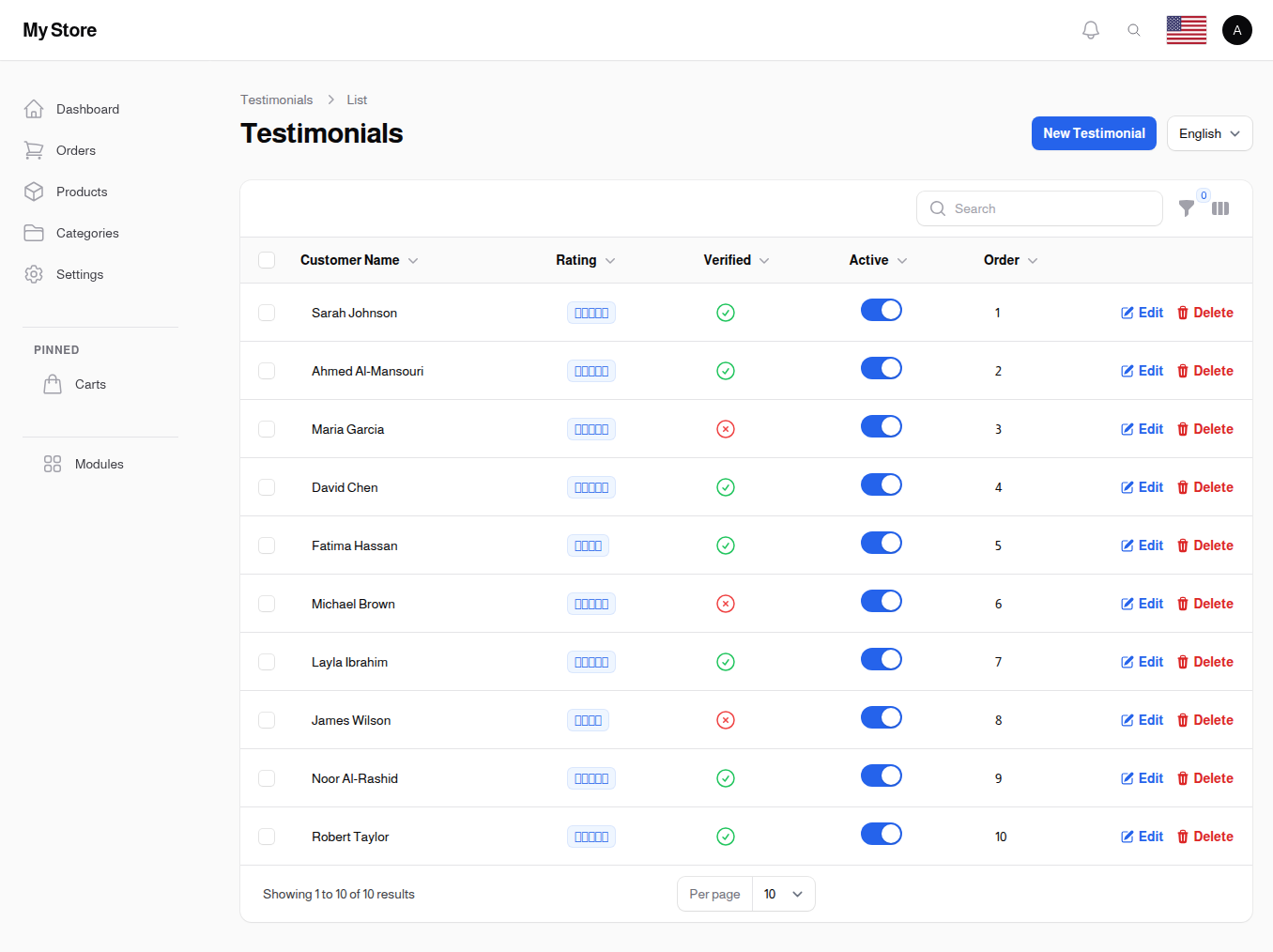
The testimonials list displays all customer testimonials you've added to your store.
Available Columns
ID
- The reference number your store gives each testimonial
- Handy when you need to point support at one specific testimonial
Customer Name
- Full name of the customer providing the testimonial
- Displayed with the testimonial
Rating
- Star rating from 1 to 5
- Visual indicator of customer satisfaction
Verified
- A checkmark or a cross showing whether the review is marked as coming from a verified purchase
Active
- Toggle to show/hide testimonial
- Only active testimonials appear on the storefront
Display Order
- The number that decides where the testimonial appears, lower numbers appear first
- The list is sorted by this order by default
Created At
- When the testimonial was added
- Helps track recent reviews
The review text itself is not shown in the list. Click Edit on a testimonial to read or change what the customer wrote.
List Features
Locale Switcher
- Switch between languages
- Manage testimonial content in different languages
Search Bar
- Search testimonials by customer name or by reference number
- Words from inside the review text are not searched
Toggle Columns
- Customize visible columns in the list
Filters
- Active: show all testimonials, only the ones currently showing on your storefront, or only the hidden ones
- Verified: show all testimonials, only those marked as verified purchases, or only those that are not
New Testimonial Button
- Add new testimonials
Creating a Testimonial
Click the New Testimonial button to add a testimonial. The form opens in a dialog over the list, so you keep the search and filters you were working with. When you are done, click Create.
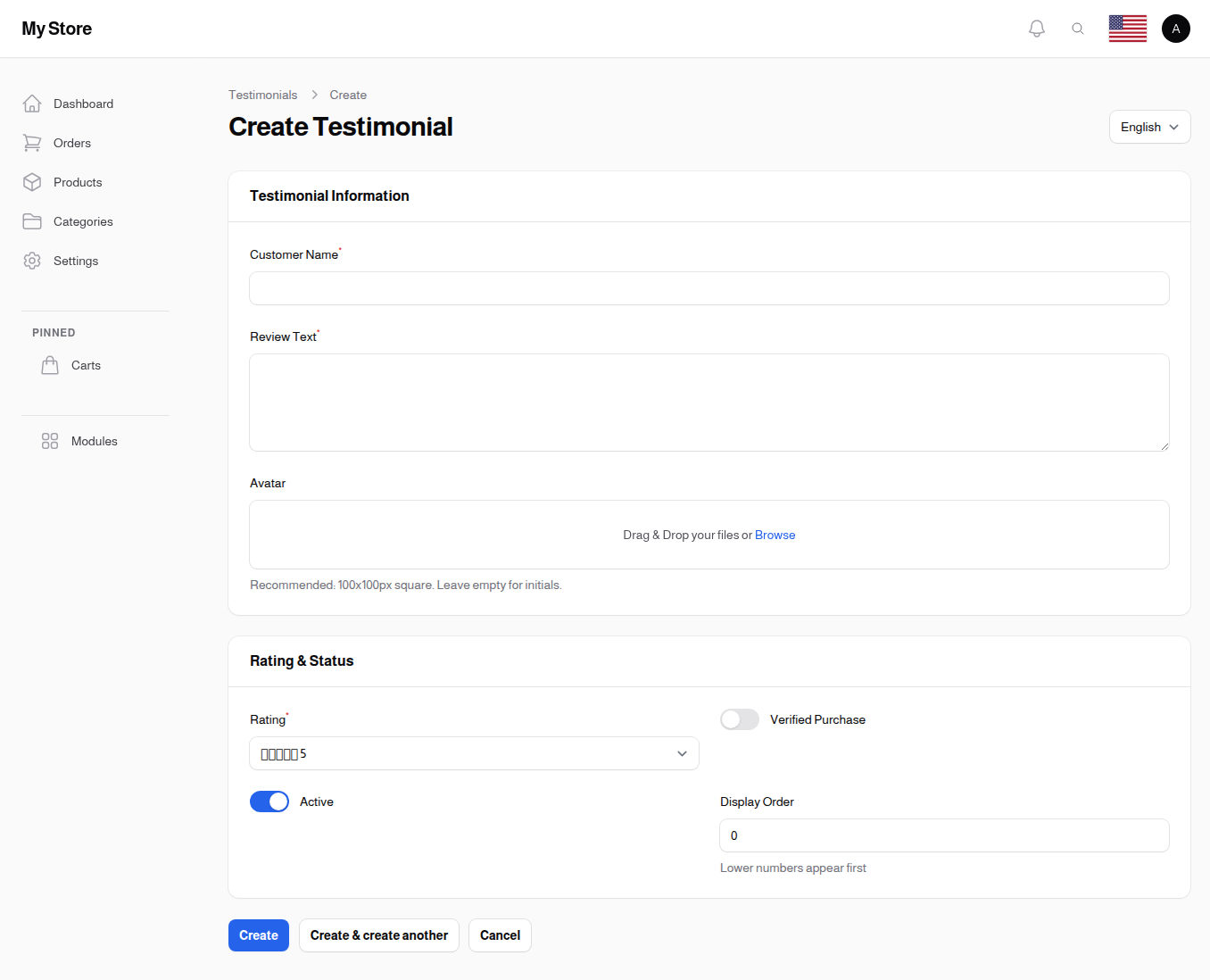
Customer Name (Required)
The name of the customer providing the testimonial.
- Should be the actual customer's name
- Displayed publicly with the review
- Multiple language support available
Examples: "John Smith", "Sarah Johnson", "Ahmed Al-Rashid"
Review (Required)
The testimonial text - what the customer said about your store or products.
- Keep authentic and natural
- Should be specific and detailed
- Multiple language support available
- Longer reviews provide more credibility
Example: "I've been shopping here for 6 months and the quality is outstanding. Fast shipping, great customer service, and excellent products. Highly recommend!"
Rating (Required)
Star rating from 1 to 5 stars.
- Range: 1 (lowest) to 5 (highest)
- Default: 5 stars
- Visual display as stars on the storefront
- Most testimonials should be 4-5 stars for credibility
Avatar
Optional customer photo or avatar image.
- Format: Image upload
- Recommended: Square, around 100×100 pixels
- Maximum size: 2MB, larger files are rejected
- Adds authenticity to the testimonial
- Leave it empty and the customer's initials are shown instead, so there is no need to find a stand-in photo
Active
Toggle to control testimonial visibility.
- Default: Enabled (active)
- Only active testimonials appear on the storefront
- Disable to temporarily hide without deleting
Verified Purchase
Toggle marking this review as coming from a customer who actually bought from you.
- Default: Disabled
- Use it only for reviews you can genuinely stand behind, since it is a trust signal for buyers
Display Order
A number deciding where this testimonial sits among the others.
- Default: 0
- Lower numbers appear first
- Give your strongest testimonials the lowest numbers so they are seen first
Editing Testimonials
To edit an existing testimonial:
- Find the testimonial in the list
- Click the Edit action
- Make your changes
- Click Save changes
Deleting Testimonials
To remove a testimonial:
- Click the Delete action next to the testimonial
- Confirm the deletion
Note: Consider disabling instead of deleting to preserve the testimonial for future use.
Bulk Actions
Delete Selected
Remove multiple testimonials at once:
- Select checkboxes next to testimonials
- Choose Delete from bulk actions
- Confirm deletion
How Testimonials Appear on Your Store
Testimonials can be displayed in several ways:
Reviews Marquee Component
- Scrolling display of testimonials
- Shows customer name, rating, and review text
- Avatar displayed if provided
- Continuous animation for visual appeal
- Can be added to any page using the page builder
Key Display Elements
- Customer Name: Shown prominently
- Star Rating: Visual stars based on rating value
- Review Text: Full testimonial content
- Avatar: Customer photo (if provided)
Tips for Managing Testimonials
Authenticity
- Use real customer feedback when possible
- Keep the natural voice and tone
- Include specific details about products or services
- Mix of ratings (mostly 4-5 stars) is more credible than all perfect scores
Content Quality
- Longer, detailed reviews are more convincing
- Include specific product or service mentions
- Highlight different aspects (shipping, quality, service)
- Avoid overly promotional language
Visual Appeal
- Add customer avatars when available
- Use high-quality images
- Maintain consistent image sizes
- Consider using diverse customer photos
Organization
- Rotate featured testimonials regularly
- Keep testimonials current and recent
- Remove outdated references
- Update language translations as needed
Strategic Display
- Feature testimonials on key pages (homepage, product pages)
- Match testimonials to relevant product categories
- Use the marquee component for prominent display
- Highlight testimonials with high ratings
Related Sections
- Pages - Add testimonial sections to pages
- Social Media Links - Connect social proof
- Reviews - Customer product reviews
Best Practice: Testimonials work best when they're authentic, specific, and showcase real customer experiences. Regularly update your testimonials to keep them fresh and relevant.